
Updated September 18, 2026
There are plenty of tools out there that can help you track maintenance requests, but only a few are purpose built for construction equipment and construction shops and field mechanics. Construction businesses will benefit most from software that:
- Automates maintenance scheduling to avoid missing critical service, reduce human error and prevent unexpected breakdowns
- Provides real-time equipment health monitoring for data-driven maintenance decisions
- Keeps a digitized, live library of parts for inventory management and smoother maintenance requests, work orders, and emergency repairs
- Tracks mechanic time to keep tabs on not only resource needs but also the true cost of equipment repairs and maintenance
- Connects directly to equipment inspections for safety and immediate attention to equipment repair and servicing needs.
- Centralizes record-keeping for regulatory compliance and equipment reliability tracking
- Offers comprehensive reporting with insights into equipment performance and maintenance history
- Includes mobile access for field teams to update and retrieve information quickly
- Integrates with construction ERPs to centralize cost data.
With over 750 construction companies relying on Tenna, we’ve built deep expertise in what contractors actually need from construction equipment maintenance software. Working across diverse fleet sizes and equipment types, we’ve learned what separates truly construction-focused solutions from generic tools.
In this guide, we’ve compiled the best construction equipment maintenance software platforms, including details on each platform’s advantages, shortcomings, and pricing. We’ve also covered the key equipment maintenance features, which you can find in an easy-to-scan comparison table below if you want to jump right into the specifics.
The first on the list is our own solution, Tenna. It’s designed by contractors for contractors to easily manage the scheduling and tracking of all elements of vehicle and heavy equipment maintenance.
| Feature | Tenna | Fleetio | Limble CMMS | eMaint | HCSS Equipment360 | Simply Fleet | EquipMate |
|---|---|---|---|---|---|---|---|
| Automated Maintenance Alerts | Yes | Yes | Yes | Yes | Yes | Yes | Yes |
| Preventative Maintenance Automation | Yes | Yes | Yes | Yes | Yes | Yes | No |
| Work Order Creation & Assignment | Yes | Yes | Yes | Yes | Yes | Yes | Yes |
| Customizable Inspection Checklists | Yes | Yes | Yes | Yes | Limited | Yes | Yes |
| Automated Fault Codes/DTCs | Yes | Yes | Limited | Limited | Yes | Limited | No |
| Cost Codes | Yes | Limited | Limited | Limited | Yes | Limited | No |
| Equipment Parts Management | Yes | Yes | Yes | Yes | Yes | Yes | Yes |
| Parts Inventory Barcode Scanning | Yes | Yes | Yes | Yes | Yes | Yes | No |
| Field-to-Shop Maintenance Requests | Yes | Yes | Limited | Limited | Limited | Limited | Limited |
| Mechanic Time Cards | Yes | Limited | Yes | Yes | Yes | Limited | Limited |
| Mobile App | Yes | Yes | Yes | Yes | Limited | Yes | Yes |
| Natively Built into Single Platform | Yes | Yes | Yes | No | No | Yes | No |
| Construction ERP Integrations | Yes | No | Yes | Limited | Yes | No | No |
| OEM/AEMP Integrations | Yes | Yes | No | No | Yes | No | No |
| Tailored to Construction Industry | Yes | Limited | Limited | Limited | Yes | Limited | Limited |
1. Tenna
Tenna is a complete construction technology platform designed to help contractors maximize mixed fleets with solutions that connect field, shop, and office. Our computerized maintenance management system (CMMS) handles everything from preventative maintenance schedules to mechanic workloads, helping you extend equipment lifespan and increase equipment uptime.
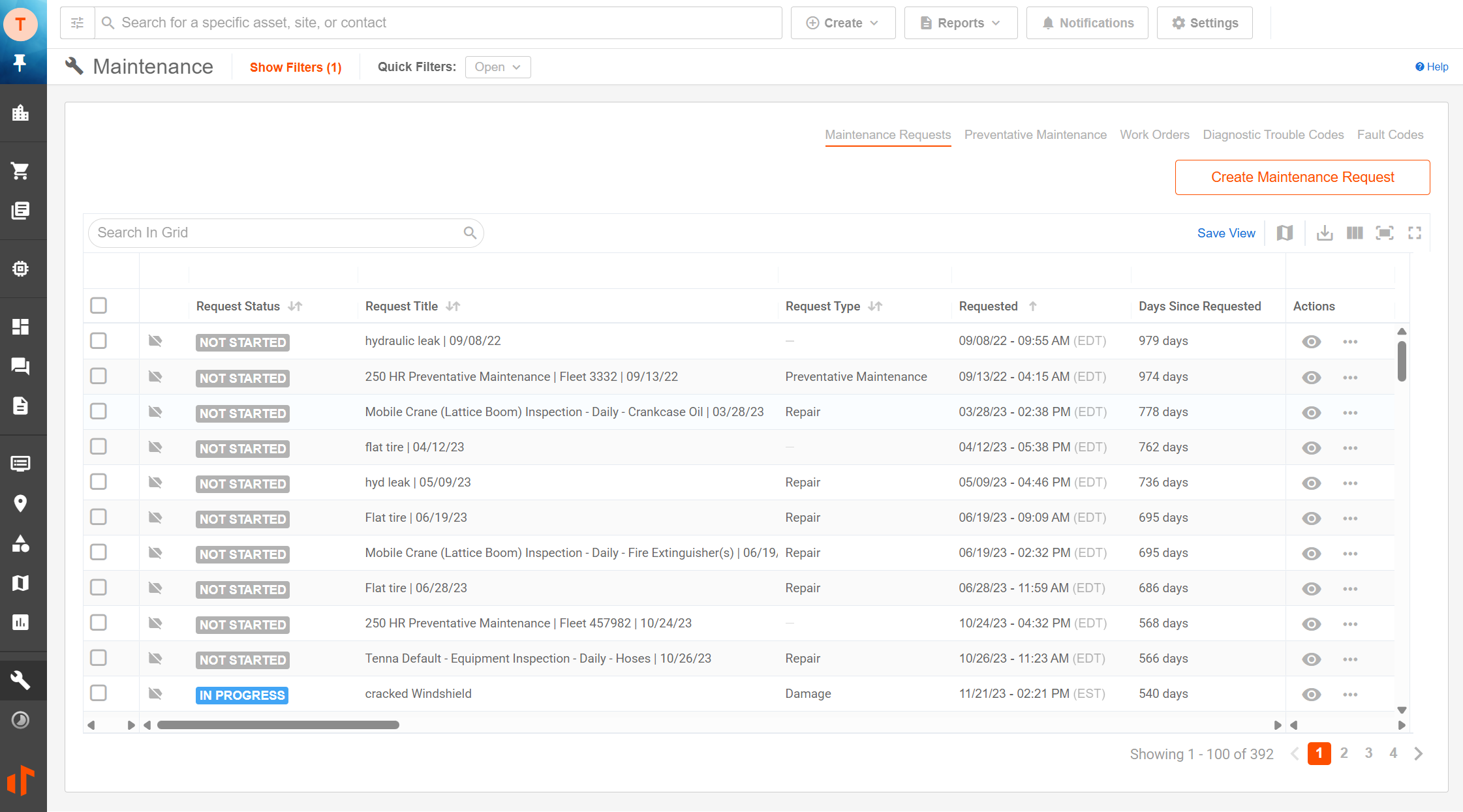
Maintenance Requests
When you use our CMMS software, there’s no need for field teams to leave the jobsite to report equipment problems. Workers submit maintenance tasks through the Tenna mobile app using voice memos or text notes, while managers can track request status with detailed asset-level data to prioritize workloads.
Preventative Maintenance
Skip the one-size-fits-all approach and set the right maintenance schedule for each piece of fleet equipment. Create schedules based on equipment usage, including hours, miles, or calendar days. When preventive maintenance tasks are due, Tenna automatically creates maintenance requests, helping you avoid missing critical service intervals even during busy project periods.
Real Contractors, Real Results
Equipment operations using Tenna report achieving 100% on-time preventative maintenance compliance and eliminating compliance backlogs. Want to know more? Read through preventative maintenance use cases and results from contractors just like you.
Fault Codes and Diagnostic Trouble Codes (DTC)
Know exactly what’s wrong with your equipment before sending a mechanic. GPS trackers send equipment fault codes directly to Tenna, speeding up response times and converting fault codes to maintenance requests with one click.
The diagnostic trouble code feature pulls information directly from your vehicle’s electronic control unit, helping shop teams understand root causes rather than just symptoms.
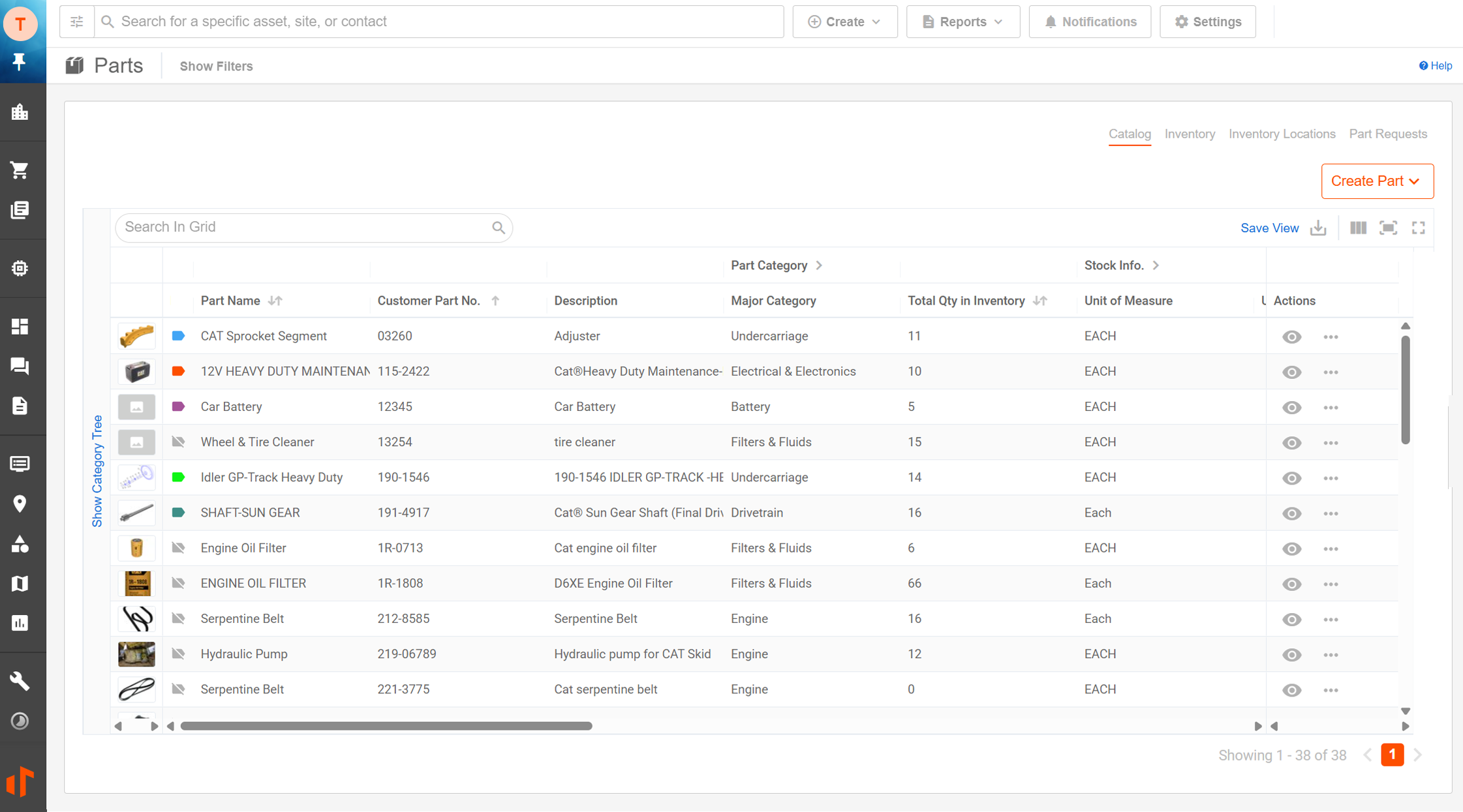
Parts Management
Stop wasting time hunting for parts across multiple locations or facilities. The built-in parts catalog and inventory tracking shows what’s available where. Request parts through the app, track lifecycles and warranties, and prevent inventory shortages that delay repairs.
The system alerts you when parts reach minimum quantities and tracks fulfillment status, helping you avoid scheduling delays without overstocking inventory. By having accurate parts information and diagnostic data at your fingertips, you eliminate wasted service trips. In fact, contractors have saved $500 to $1,500 per service trip by reducing diagnostic dead runs and ensuring the right parts are on hand before mechanics arrive.
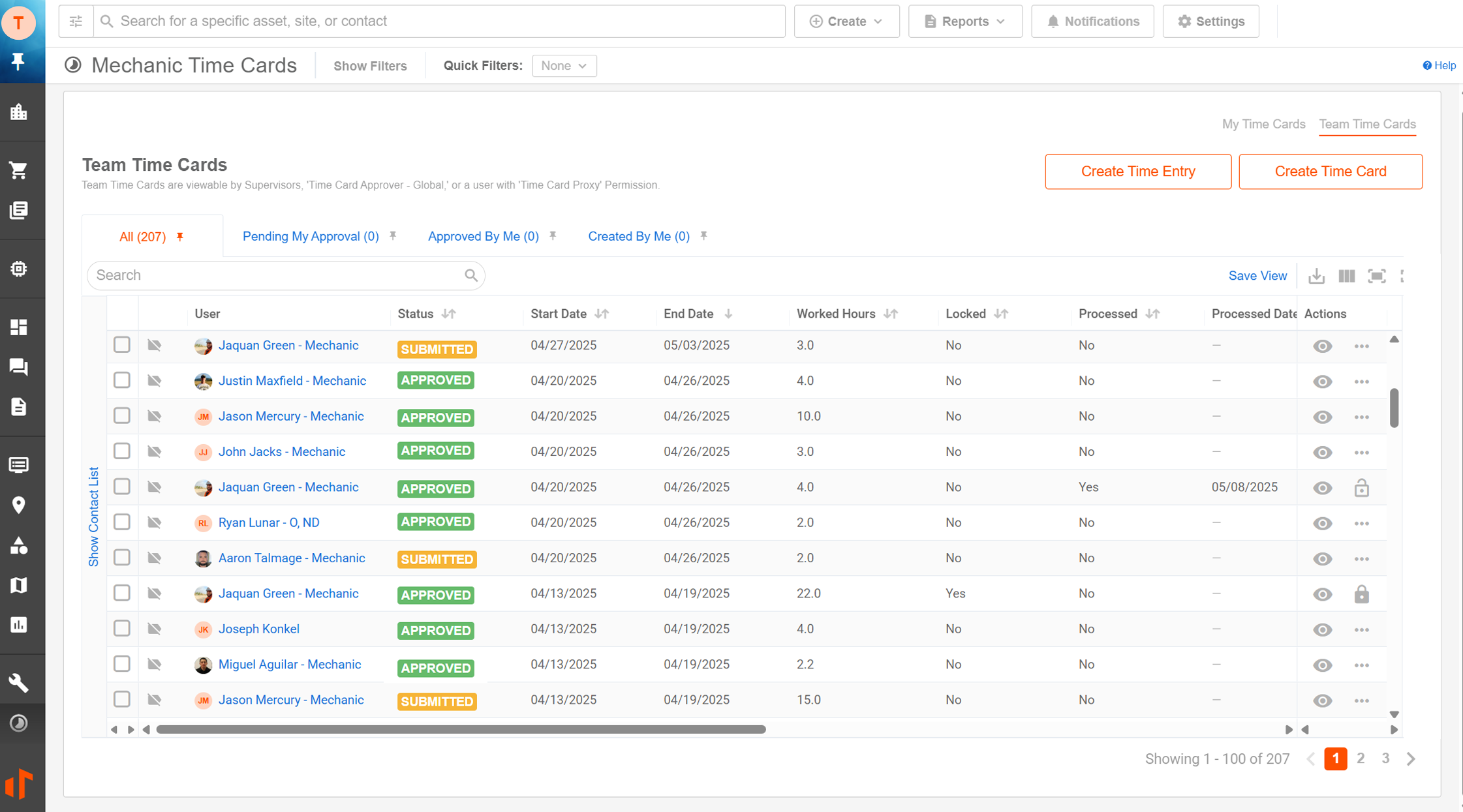
Time Cards
Spend mechanics’ time wisely — on the right jobs and costs. With Tenna, mechanics log time against sites, assets, work orders, and specific maintenance requests. Make them work for your team by customizing time types and class codes and setting labor cost rates. Then, incorporate your approval process for more efficient time card reviews.
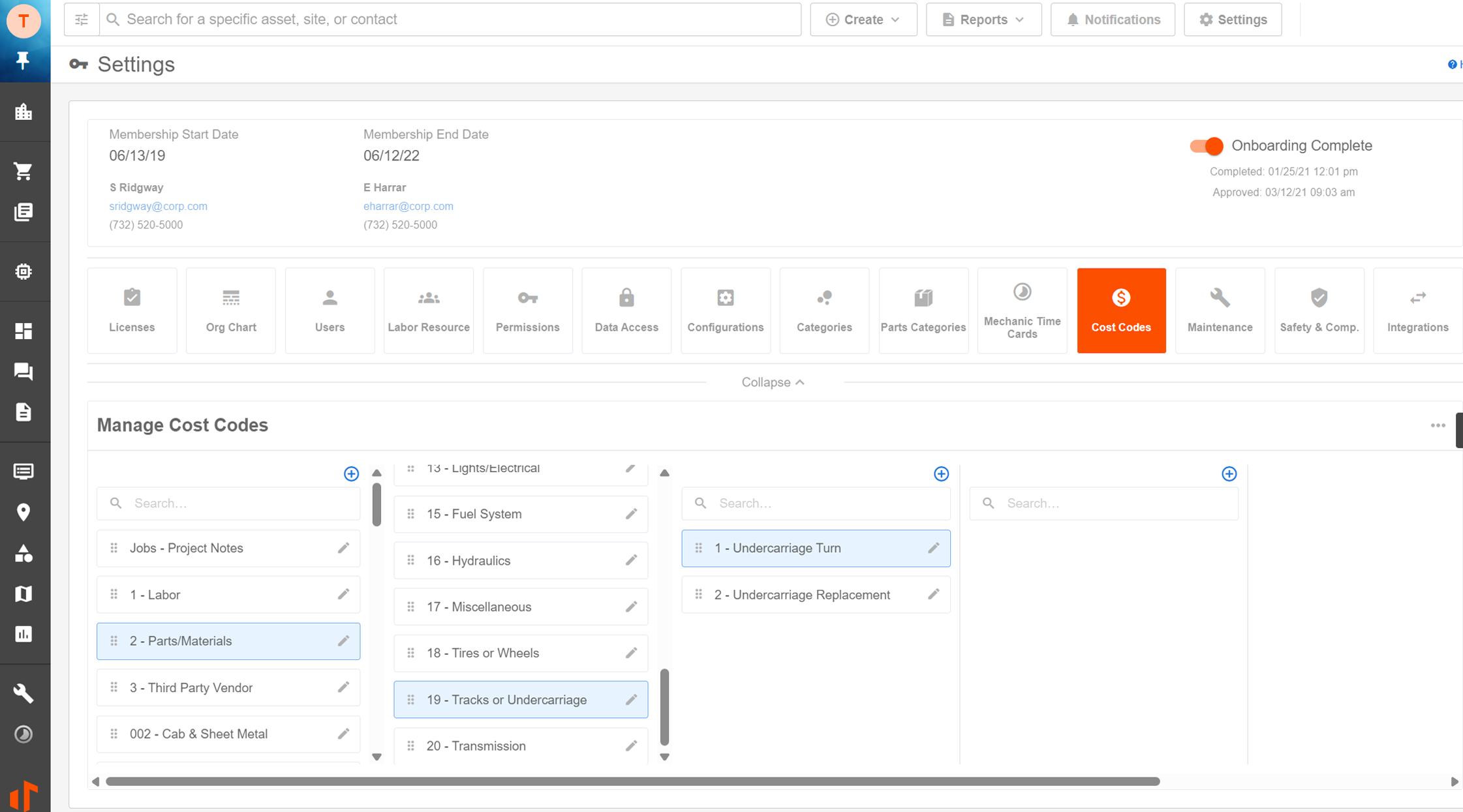
Cost Codes
Tenna’s cost codes are fully customizable, giving you complete visibility into equipment maintenance expenses. Associate cost codes with preventative maintenance, work orders, mechanic time cards, and more. This helps with accurate job costing, identifying problematic assets, and getting a complete understanding of your finances.
Repair Documentation and Reporting
Effective maintenance of your construction equipment does more than just reduce idle time and keep equipment running — it impacts your bottom line. Tenna helps you control operating costs by minimizing unexpected repairs and labor expenses and retain better compliance documentation and equipment records for regulatory requirements.
Tenna’s robust reporting includes:
- Parts consumption
- Maintenance records
- Failed mechanical inspection forms
- Rental cost reports
- And other performance reports
![7 Best Construction Equipment Maintenance Software [2026] - construction equipment maintenance software](https://tennastaging.wpengine.com/wp-content/uploads/2026/09/tenna-maintenance-screenshot-2026.png)
Customer Support
Tenna’s support starts with hands-on implementation and continues for the life of your account. When questions arise, you can speak directly with an expert or use our online help system with step-by-step guides and videos.
To set up your team for success, we also offer SOP consultations, specialized mechanic certification training, a dedicated account rep, and role-based training customized to each user’s specific needs.
Key Equipment Maintenance Features
- Automated Maintenance Alerts ✅
- Preventative Maintenance Automation ✅
- Work Order Creation & Assignment ✅
- Customizable Inspection Checklists ✅
- Automated Fault Codes/DTCs ✅
- Cost Codes ✅
- Equipment Parts Management ✅
- Parts Inventory Barcode Scanning ✅
- Field-to-Shop Maintenance Requests ✅
- Mechanic Time Cards ✅
- Mobile App ✅
- Natively Built into a Single Equipment Management Platform ✅
- Construction ERP Integrations ✅
- OEM/AEMP Integrations ✅
- Tailored to the Construction Industry ✅
Feature Examples in Practice
- Preventive Maintenance Scheduling: You have 20 pieces of heavy equipment running different hours each day on active projects. Instead of servicing everything on a fixed schedule, Tenna pulls actual usage data and automatically creates maintenance requests when specific equipment hits its service threshold, so your dozers and excavators get maintained based on real wear, not guesswork.
- Work Order Management: A mechanic in the shop notices a hydraulic issue on a loader that’s three miles away on an active job site. Instead of making a phone call and waiting for someone to relay the message, he submits a work order through the mobile app with a voice memo describing the problem. The site manager sees it immediately, prioritizes it against other equipment issues, and coordinates the repair without project delays.
- Parts Management: Your shop needs a specific bearing for a compressor repair, but you’re not sure if it’s in stock at your main facility or at the satellite location. Tenna’s parts catalog shows exactly where the bearing is, tracks warranty status, and alerts you when inventory runs low so you grab the right part without delays and avoid ordering duplicates you don’t need.
- Compliance Tracking: A state inspector shows up asking for all maintenance records on 15 pieces of equipment from the past two years. Instead of pulling boxes of paperwork, you generate a digital report showing every service date, repair, inspection, and certification; all organized by asset and ready to audit.
What Real Customers Are Saying About Tenna
“We can now focus on being proactive with PMs and not reactive. Collecting hours daily gives our mechanics better insight into the health of our machines and allows them to create more realistic schedules. This, partnered with accurate locations of equipment has allowed us to better plan services and cut down on travel time.”
-Pat L., Project Manager, Severino Trucking
“We save money in preventive maintenance. So, we’re able to get things on time and down the road parts aren’t breaking down as fast.”
Mike B., General Superintendent, Zefiro
Pricing
2. Fleetio
![7 Best Construction Equipment Maintenance Software [2026] - construction equipment maintenance software](https://tennastaging.wpengine.com/wp-content/uploads/2026/09/fleetio-maintenance-screenshot-9-2026.jpg)
Fleetio helps construction companies manage equipment maintenance by automatically scheduling services based on usage data. The software tracks maintenance across mixed fleets, which reduces equipment downtime, controls fuel costs, and stays compliant with regulations that affect construction operations.
Key Equipment Maintenance Features
- Automated Maintenance Alerts ✅
- Preventative Maintenance Automation ✅
- Work Order Creation & Assignment ✅
- Customizable Inspection Checklists ✅
- Automated Fault Codes/DTCs ✅
- Cost Codes ⚠️ (No Project/Job Codes)
- Equipment Parts Management ✅
- Parts Inventory Barcode Scanning ✅
- Field-to-Shop Maintenance Requests ✅
- Mechanic Time Cards ⚠️ (No Detailed Labor or Approvals)
- Mobile App ✅
- Natively Built into a Single Equipment Management Platform ✅
- Construction ERP Integrations 🚫
- OEM/AEMP Integrations ✅
- Tailored to the Construction Industry ⚠️ (Designed for Multiple Industries)
Feature Examples in Practice
- Automated Fault Code Collection: Your excavator’s engine management system detects a problem and triggers a fault code. Instead of waiting for a mechanic to physically plug in a diagnostic scanner, Fleetio automatically pulls that fault code from your equipment’s telematics and converts it into a work order.
- Parts Inventory Management: Parts for your fleet are spread across two locations. Fleetio tracks what’s in stock where, sends reorder notifications when inventory runs low, and gives your shop visibility into parts availability before they submit a work order.
Advantages
- Automated DTC and fault code collection from a wide range of telematics providers and OEM integrations
- Comprehensive parts and inventory management, including reorder notifications and usage tracking
Shortcomings
- Some users report that mechanic time tracking is basic and lacks granular labor breakdowns
- Inspection checklist customization is robust but advanced conditional logic is limited
Pricing
Starts at $4 per vehicle, per month (billed annually).
3. Limble CMMS
![7 Best Construction Equipment Maintenance Software [2026] - construction equipment maintenance software](https://tennastaging.wpengine.com/wp-content/uploads/2026/09/limble-maintenance-screenshot-9-2026.jpg)
Limble CMMS offers maintenance software that keeps heavy machinery running reliably. The platform automates work order creation and tracking to maintain safer jobsites without added paperwork. It also helps schedule preventive maintenance to avoid equipment breakdowns and costly project delays.
Key Equipment Maintenance Features
- Automated Maintenance Alerts ✅
- Preventative Maintenance Automation ✅
- Work Order Creation & Assignment ✅
- Customizable Inspection Checklists ✅
- Automated Fault Codes/DTCs ⚠️ (via Select Integrations)
- Cost Codes ⚠️ (No Project/Job Codes)
- Equipment Parts Management ✅
- Parts Inventory Barcode Scanning ✅
- Field-to-Shop Maintenance Requests ⚠️ (No Voice Support)
- Mechanic Time Cards ✅
- Mobile App ✅
- Natively Built into a Single Equipment Management Platform ✅
- Construction ERP Integrations ✅
- OEM/AEMP Integrations 🚫
- Tailored to the Construction Industry ⚠️ (Designed for Multiple Industries)
Feature Examples in Practice
- Escalation-Based Maintenance: Your pile driver starts making noise during a shift. Limble’s escalation rules immediately flag it as urgent based on equipment criticality and the issue reported, routing it to your shop with priority, so the problem gets diagnosed before it becomes a jobsite shutdown.
- Barcode & QR Code Parts Tracking: Your mechanic is assembling parts for a transmission rebuild. Instead of manually searching through inventory lists, he scans the barcode on each part, Limble confirms it’s in stock and updates inventory in real-time.
Advantages
- Preventive maintenance automation with asset-specific schedules and escalation rules
- Integration with barcode and QR code scanning for parts and asset management
Shortcomings
- Automated DTC collection requires third-party telematics integration
- Cost code and project tracking is limited to general cost centers, not construction-specific codes
Pricing
Pricing not publicly available.
4. eMaint
![7 Best Construction Equipment Maintenance Software [2026] - construction equipment maintenance software](https://tennastaging.wpengine.com/wp-content/uploads/2026/09/emaint-maintenance-screenshot-9-2026.jpg)
eMaint’s construction equipment maintenance software helps contractors identify potential machine failures before they affect project schedules. The system tracks work orders, equipment, and materials while featuring condition monitoring tools that create maintenance tasks automatically.
Key Equipment Maintenance Features
- Automated Maintenance Alerts ✅
- Preventative Maintenance Automation ✅
- Work Order Creation & Assignment ✅
- Customizable Inspection Checklists ✅
- Automated Fault Codes/DTCs ⚠️ (via Select Integrations)
- Cost Codes ⚠️ (No Project/Job Codes)
- Equipment Parts Management ✅
- Parts Inventory Barcode Scanning ✅
- Field-to-Shop Maintenance Requests ⚠️ (No Voice Support)
- Mechanic Time Cards ✅
- Mobile App ✅
- Natively Built into a Single Equipment Management Platform 🚫
- Construction ERP Integrations ⚠️ (No Voice Support)
- OEM/AEMP Integrations 🚫
- Tailored to the Construction Industry ⚠️ (Requires Low Code Integration)
Feature Examples in Practice
- Multi-Level Work Order Approvals: Three electrical system repairs come in on the same day, but only one certified electrician is available. eMaint routes each work order through a two-level approval process so leadership can prioritize which repair happens first.
- Comprehensive Compliance Documentation: During a safety incident review, you need maintenance history for the equipment involved. eMaint pulls everything (service dates, parts replaced, repairs completed, technician notes) so auditors have a complete picture of how you maintained that asset.
Advantages
- Extensive work order management system with multi-level approvals and automated assignment rules
- In-depth maintenance history and compliance tracking for audits and inspections
Shortcomings
- Construction is not a specific industry focus (they make solutions for manufacturing, facilities, oil & gas, food & beverage, healthcare, and government)
- Automated DTC collection works with select integrations and may not support all equipment types
- Mobile offline support can be inconsistent
Pricing
Starting at $69 per user per month (billed annually).
5. HCSS Equipment360
![7 Best Construction Equipment Maintenance Software [2026] - construction equipment maintenance software](https://tennastaging.wpengine.com/wp-content/uploads/2026/09/hcss-maintenance-screenshot-9-2026.jpg)
HCSS Equipment360 handles construction equipment maintenance through data-driven scheduling. The preventative maintenance scheduling system creates alerts based on calendar days, runtime hours, and odometer readings. It has additional tracking for equipment certification, licensing, inspections, and warranties.
Key Equipment Maintenance Features
- Automated Maintenance Alerts ✅
- Preventative Maintenance Automation ✅
- Work Order Creation & Assignment ✅
- Customizable Inspection Checklists ⚠️ (Basic Capabilities Only)
- Automated Fault Codes/DTCs ✅
- Cost Codes ✅
- Equipment Parts Management ✅
- Parts Inventory Barcode Scanning ✅
- Field-to-Shop Maintenance Requests ⚠️ (No Voice Support)
- Mechanic Time Cards ✅
- Mobile App ⚠️ (No Android Support)
- Natively Built into a Single Equipment Management Platform 🚫
- Construction ERP Integrations ✅
- OEM/AEMP Integrations ✅
- Tailored to the Construction Industry ✅
Feature Examples in Practice
- Project-Tied Maintenance Costs: You’re managing three concurrent projects and need to know how much equipment maintenance is actually costing each one. HCSS ties work orders, parts costs, and mechanic hours directly to the project it was worked on.
- Automated Fault Code Detection: Your loader’s engine management system flags a potential issue. HCSS automatically pulls that fault code from your telematics or OEM data and converts it into a maintenance alert.
Advantages
- Native support for project and job cost codes is tied directly to maintenance activities
- Automated DTC and fault code collection from HCSS Telematics and OEM sources
Shortcomings
- Disjointed products are not all very well integrated into a single platform
- Mobile app is iPad-only, with no native Android support
- Inspection checklist lacks advanced conditional logic
- Pricing structure can quickly get expensive as you add more users
Pricing
Pricing not publicly available.
6. Simply Fleet
![7 Best Construction Equipment Maintenance Software [2026] - construction equipment maintenance software](https://tennastaging.wpengine.com/wp-content/uploads/2026/09/simplyfleet-maintenance-screenshot-9-2026.jpg)
Simply Fleet construction equipment maintenance software helps teams execute service routines consistently. The software schedules maintenance based on equipment metrics like engine hours and mileage. It also sends automated alerts to ensure heavy machinery receives timely service to reduce project delays.
Key Equipment Maintenance Features
- Automated Maintenance Alerts ✅
- Preventative Maintenance Automation ✅
- Work Order Creation & Assignment ✅
- Customizable Inspection Checklists ✅
- Automated Fault Codes/DTCs ⚠️ (via Select Integrations)
- Cost Codes ⚠️ (No Project/Job Codes)
- Equipment Parts Management ✅
- Parts Inventory Barcode Scanning ✅
- Field-to-Shop Maintenance Requests ⚠️ (No Voice Support)
- Mechanic Time Cards ⚠️ (Basic Capabilities Only)
- Mobile App ✅
- Natively Built into a Single Equipment Management Platform ✅
- Construction ERP Integrations 🚫
- OEM/AEMP Integrations 🚫
- Tailored to the Construction Industry ⚠️ (Designed for Multiple Industries)
Feature Examples in Practice
- Flexible Maintenance Scheduling: You have 30 pieces of equipment with different maintenance needs. One generator needs servicing by calendar time, your compressor by engine hours, and your grader by mileage. Simply Fleet lets you set different schedule triggers for each machine type.
- Digital Inspection with Visual Evidence: A grader’s engine light comes on mid-shift. The operator snaps a photo in the Simply Fleet app, adds a note about what happened, and submits it. Your shop gets the alert with visual evidence, so they can diagnose the issue before the machine leaves the job site.
Advantages
- Automated maintenance reminders and scheduling based on odometer, hours, or time
- Digital inspection checklists with photo capture and custom fields
Shortcomings
- Cost code integration is limited to general expense categories, not project or job codes
- Automated DTC collection works with select telematics integrations only
Pricing
Starts at $20 per vehicle per year (billed annually).
7. EquipMate
![7 Best Construction Equipment Maintenance Software [2026] - construction equipment maintenance software](https://tennastaging.wpengine.com/wp-content/uploads/2026/09/equipmate-maintenance-screenshot-9-2026.jpg)
EquipMate focuses on scheduled maintenance to prevent unexpected construction equipment failures. This software includes tools for planning equipment inspections and parts replacement, with alert functions that ensure maintenance tasks happen on time by tracking status, assigning work, and setting deadlines.
Key Equipment Maintenance Features
- Automated Maintenance Alerts ✅
- Preventative Maintenance Automation 🚫
- Work Order Creation & Assignment ✅
- Customizable Inspection Checklists ✅
- Automated Fault Codes/DTCs 🚫
- Cost Codes 🚫
- Equipment Parts Management ✅
- Parts Inventory Barcode Scanning 🚫
- Field-to-Shop Maintenance Requests⚠️ (No Voice Support)
- Mechanic Time Cards ⚠️ (Basic Capabilities Only)
- Mobile App ✅
- Natively Built into a Single Equipment Management Platform 🚫
- Construction ERP Integrations 🚫
- OEM/AEMP Integrations 🚫
- Tailored to the Construction Industry ⚠️ (Designed for Multiple Industries)
Feature Examples in Practice
- Parts & Service History for Compliance: A piece of equipment is involved in a safety incident, and your company needs to prove you were maintaining it properly. EquipMate’s parts and service tracking logs show exactly when the equipment was serviced, what parts were replaced, and what repairs were completed
- Field Documentation with Photos and Notes: Your site supervisor spots hydraulic fluid leaking from an excavator. He submits a maintenance request directly from the field with photos showing the leak and equipment details. EquipMate creates the work order with all the visual context and notes, so your shop knows exactly what they’re walking into.
Advantages
- Has parts and service tracking with maintenance history logs for compliance
- Supports field maintenance requests with photo and note attachments
Shortcomings
- Lacks automated DTC collection, telematics integration, and cost code integrations
- Has mechanic time card tracking but lacks advanced approvals or multi-shift support
Pricing
Pricing not publicly available.
Ready to Keep Your Equipment Running Longer?
Construction equipment maintenance software works best when it’s built specifically for how you operate, not retrofitted from another industry. An integrated platform that connects field teams, shop mechanics, and office management eliminates information silos, reduces administrative overhead, and gives you real visibility into equipment costs and compliance.
Comparison shopping matters, and the platforms in this guide each have their strengths. But if you’re specifically looking for software built by contractors for contractors™, with an integrated approach that handles maintenance alongside utilization, asset tracking, and compliance, Tenna is purpose-built just for that.
Ready to explore whether Tenna is the right fit for your operation? Click the button below to learn more.