
Updated on November 24, 2026
In construction, coordination is everything. From managing equipment availability to aligning crews across multiple job sites, the complexity of daily operations leaves little room for error. And yet, many construction firms still rely on manual systems or disjointed tools.
Scheduling and dispatch software is a centralized platform that helps construction companies plan, assign, and track crews, equipment, and materials across jobs in real time. It centralizes critical communication, improves visibility into field operations, and gives decision-makers the tools to respond quickly to changes on the ground.
Top Benefits of Scheduling and Dispatch Software
- Reduced idle time and fewer project delays
- Centralized communication between office, shop, and field
- Real-time visibility into equipment availability and location
- Lower rental costs through optimized resource allocation
- Faster response to changes on the ground
The need couldn’t be clearer. Quickbase’s 2025 Gray Work Report cites that 52% of construction professionals say manual work has increased over the past year, despite construction already being a very manual industry.
Businesses must standardize how and where communication happens around resource management and equipment allocation. A key part of this is linking dispatching software to your equipment management system. This way, teams get real-time updates on availability, locations, and needs.
In the last three years, I have taken part in many sales cycles, all very similar to each other:
- Construction businesses look for specific solutions, like dispatch.
- Vendors provide this one solution need.
- Down the road, the buyer wants to buy more software (across shared workflows, like equipment or resource management) and are left trying to connect them, but it doesn’t work.
In this blog post, I will explain why scheduling and dispatch software is important for construction companies. I’ll also share the best software providers and key features to consider when buying to get the most from your investment.
How Scheduling and Dispatch Software Works
Most construction dispatch tools follow the same basic flow:
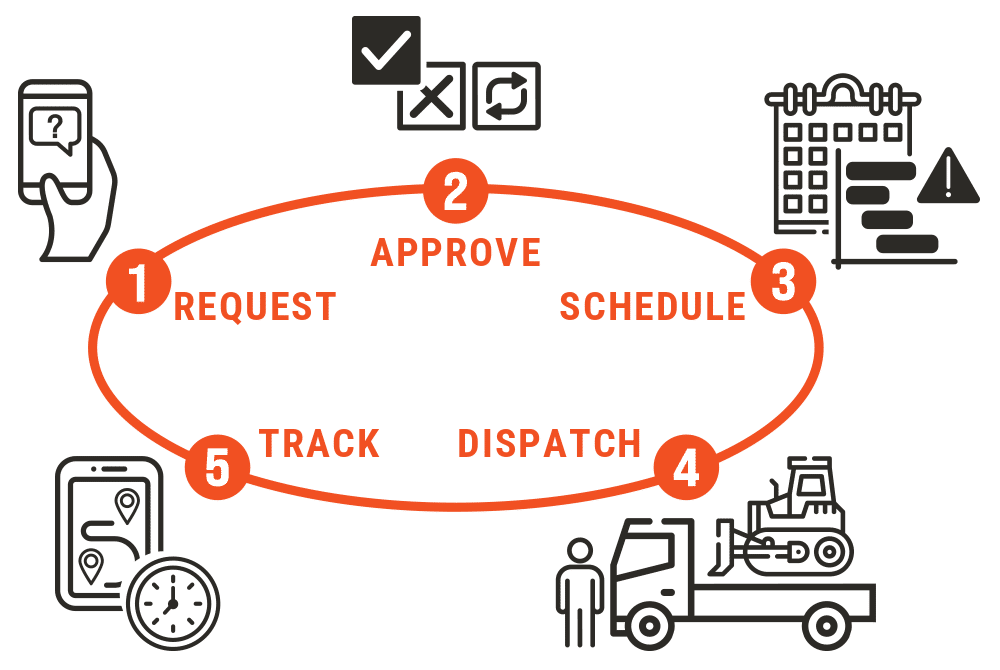
- Request: A foreman or superintendent submits a request for equipment, crews, or laborers, including the job, dates, and what is needed.
- Approve: Operations reviews the request and approves, denies, or adjusts it.
- Schedule: Approved requests go on the schedule alongside existing commitments, so conflicts show up before they become problems.
- Dispatch: The dispatcher assigns the best-fit resources and notifies the people involved.
- Track: The team follows progress in real time, and completed dispatches are logged for record-keeping and performance review.
When dispatch connects to your equipment management system, telematics can feed live decision-making. Current equipment location, availability, maintenance status, and existing commitments are visible when you assign a machine, so you are not working from a stale spreadsheet.
Benefits of Scheduling and Dispatch Software in Construction
Schedule delays remain one of the top concerns for contractors nationwide. These delays do not just affect timelines. They impact the whole organization. Labor costs go up, equipment rentals last longer, and teams have to deal with urgent problems every day.
Scheduling and dispatch software can solve for this and create a positive ripple effect through construction organizations with the benefits it brings.
Enhancing Operational Efficiency and Productivity
The traditional back-and-forth of emails, texts, and paper-based systems is a productivity killer. Modern scheduling software automates repetitive tasks, reduces double-bookings, and provides real-time updates to keep field crews aligned.
The result? Less idle time, fewer delays, and more efficient job execution. A foreman no longer has to call around the yard to learn which machine is free.
Improving Communication and Coordination on Job Sites
Miscommunication leads to rework, frustration, and missed milestones. By creating a central hub for updates and requests, scheduling and dispatch software connects the office, shop and field. This ensures every team member has access to accurate and current information. No more chasing people for answers. A change in the field shows up in the office, and a change in the office shows up in the field.
Optimizing Resource Allocation and Equipment Management
Without proper planning, valuable equipment often sits unused or gets hoarded on job sites. This leads to waste, delayed mobilization, and the costly need to rent additional assets.
A connected dispatch system shows you equipment availability in real-time. This helps you lower rental costs and plan needs weeks ahead. It also keeps teams productive by providing the right tools when they need them.
For example, a machine sitting idle on one site can cover a request from another before anyone rents a second one.
Key Features to Look for in Scheduling and Dispatch Software Solutions
User-Friendly Interface and Mobile Compatibility
Construction doesn’t happen behind a desk. A user-friendly, mobile-ready platform is important. It helps field teams access schedules, requests, and updates in real time. The easier it is to use, the more likely your crews are to adopt it.
Real-Time Scheduling, Visibility, and Alerts
Daily dispatch reports become outdated the moment they’re sent. Real-time schedule visibility and live alerts keep teams updated on changes right away. No more relying on calls or texts. This transparency not only improves trust but also saves hundreds of hours in back-and-forth communication.
Telematics and Equipment Visibility
Dispatch is only as good as the data behind it. Live equipment location, availability, and maintenance status help dispatchers pick the right asset the first time, instead of calling around to confirm.
Request Management and Conflict Detection
Look for a workspace that handles requests, approvals, scheduling, and dispatch in one place, with bulk actions and warnings when two assignments have a conflict.
Integration with Existing Systems
Your dispatch software should work with your existing tech stack, not against it. Integrating with systems like ERP, estimating tools, and maintenance platforms stops isolated information. This reduces errors and creates a smoother workflow across departments.
Read on to learn more about the top features of construction dispatch software.
Types of Scheduling and Dispatch Software for Construction
Not every tool that says “dispatch” does the same job. Most options fall into one of these groups, based on how contractors use them:
| Type | How it’s used | Typical user |
|---|---|---|
| Spreadsheets, whiteboards, and texts | Tracking who and what is going where by hand, with updates shared by phone or group text | Very small fleets and crews |
| Labor and scheduling tools (for example, Workyard) | Scheduling crews, assigning jobs, and tracking time and labor cost by job | Contractors focused on workforce and job costing |
| Dispatch-board tools (for example, HCSS Dispatcher, B2W Schedule) | Planning crews, equipment, and materials on a visual board and sending assignments to the field | Heavy civil teams moving from manual boards to digital planning |
| Field service tools (for example, FieldEdge, Smart Service) | Booking technician appointments, dispatching to customer sites, and tying jobs to invoicing | HVAC, plumbing, and electrical contractors |
| Construction platforms with telematics (for example, Tenna) | Requesting, approving, scheduling, dispatching, and tracking equipment and crews in one workspace, using live location and availability | Contractors managing mixed fleets across multiple jobsites |
Top Scheduling and Dispatch Software Vendors for Construction Businesses
Choosing the right partner is just as important as choosing the right features. Here are some of the leading vendors trusted by contractors across the construction industry:
- Tenna – Mid-to-large self-perform, heavy civil construction companies needing mixed asset and equipment tracking, utilization monitoring and maintenance integrated with a tool for dispatching equipment and crews across multiple jobsites.
- Workyard – Small to mid-sized contractors focused on labor and job costing accuracy.
- HCSS Dispatcher – Heavy civil contractors who need to manage equipment and crew movement across multiple jobsites.
- FieldEdge – Field service businesses (HVAC, plumbing, electrical) needing strong dispatch-to-invoice workflows.
- Smart Service – Small-to-medium service companies looking for a QuickBooks-integrated dispatch solution.
- B2W Schedule – Heavy civil contractors looking for centralized scheduling and real-time field coordination.
Continue reading for a more extensive overview of construction dispatch management software platforms.
How to Choose the Right Scheduling and Dispatch Software for Your Construction Business
Assess Your Operational Needs and Challenges
Start with your people. What’s holding them back? Is it delayed equipment, manual scheduling, or confusion between departments?
Write down your top three problems, such as late equipment, double-booked machines, or tools that don’t share data. These become your buying criteria.
Involve people from operations, dispatch, maintenance, and field teams. This helps you understand the real challenges, not just the ones visible from the office.
Evaluate Scalability, Support, and Strategic Fit
Don’t just buy for today — buy for the next decade. Many contractors begin with a basic GPS or dispatch tool. Later, they often buy more software and try to connect everything. This leads to siloed data, low adoption, and frustration across teams.
Look for partners that:
- Focus on the construction industry
- Support long-term growth and integration
- Offer strong onboarding and customer support
- Connect to your ERP, accounting, and equipment data, so you aren’t re-entering information
Bonus points if the platform is purpose-built for your sector, like Tenna, a leader in construction resource management and dispatch technology.
Best Practices for a Smooth Implementation
Rolling out new software takes more than a purchase order. To ensure success:
- Involve end-users early for functional testing and buy-in.
- Roll out the tool in phases if needed.
- Address change resistance through training and communication.
- Align leadership around long-term goals, not just short-term fixes.
Take Better Control with Scheduling and Dispatch Software
Construction is too complex and too fast-moving for outdated tools and fragmented communication. Scheduling and dispatch software helps eliminate the guesswork, reduce project delays, and improve coordination across your entire organization.
By choosing the right partner, standardizing communication, and giving your teams real-time tools, you will save time and money. You will also create a more confident, efficient, and connected workforce.
Next Steps:
- Assess your internal challenges and gather feedback from impacted teams.
- Explore the market with a clear list of needs.
- Prioritize platforms that offer real-time visibility, mobile access, and true integration.
- Invest in technology that will grow with your business.