Mass DOT is currently advertising the Phase III Middlesex Turnpike Improvement project at $34,100,000. Equipment spend on a heavy civil job typically runs 15 to 30 percent of the total budget—call it $5 to $10 million on a job that size. Save just 2 percent on that equipment budget through better dispatch and resource coordination, and you’ve added $170,500 to the bottom line. On a single job.
That number doesn’t come from buying cheaper machines or cutting crews. It comes from knowing where your equipment is, moving it faster, and eliminating the idle time and mis-dispatches that quietly bleed margin on every project. Most profit in construction is gained or lost in the field.
And in the field, the difference between a well-run dispatch operation and a fragmented one shows up in superintendent confidence, equipment availability, and the compounding cost of assets sitting idle because nobody was sure when they were needed elsewhere.
The contractors pulling ahead in 2026 aren’t just dispatching faster. They’re dispatching on reality with live telematics, confirmed availability, and a single source of truth that the office and the field both trust. Construction dispatch software has matured significantly in recent years, but not all platforms have matured equally. This guide breaks down what the category looks like at its best—the features that drive real operational returns, and the questions worth asking before you commit.
What Is Construction Dispatch Software?
Construction dispatch software is a purpose-built platform that enables operations teams to request, approve, schedule, assign, and track the movement of equipment, crews, and laborers across active job sites, ideally in real time, from a single workspace.
The definition matters because it’s easy to confuse construction dispatch software with two related but insufficient categories: generic scheduling tools (built for tasks, not asset movement, or confused with project scheduling) and standalone telematics platforms (built for tracking, not operational decision-making).
True construction dispatch software sits at the intersection of both connecting live asset data to the workflow of actually moving resources where they need to be.
At its core, a modern construction dispatch solution handles:
- Resource requests – field-initiated requests for equipment, crews, or laborers by site or job
- Approvals and scheduling – reviewing, approving, and slotting requests against actual availability
- Dispatch execution – assigning specific assets and labor to jobs with automated notifications
- Real-time visibility – GPS-tracked location and status for all connected assets
- Utilization visibility – live utilization data surfaced at the point of dispatch, so every assignment is informed by which assets need the hours, which are idle, and which are being over-relied on across the fleet
- Maintenance insights – service status, upcoming intervals, and repair history integrated into asset selection, so dispatchers are always choosing assets that are genuinely ready to work, not just unscheduled
- Driver and operator notifications – SMS-based alerts for assignment confirmations and schedule changes, so every operator is working from the latest dispatch information regardless of device or connectivity
- Conflict detection – surfacing double-bookings, maintenance holds, and availability gaps before they become field problems
- Transfers – reassigning resources between jobs and sites quickly, with clean cost tracking
- Reporting and utilization analytics – understanding where assets went, how long they were on-site, and where idle time occurred
The gap between platforms that genuinely do all of this in a single, connected workspace, informed by live telematics and platforms that approximate it across multiple disconnected screens is the most important distinction in the category today.
Signs Your Operation Needs Dedicated Dispatch Software
Not every contractor needs to overhaul their dispatch operation immediately. But most growing operations hit a threshold where the manual approach becomes the bottleneck costing more in idle time, mis-dispatches, and administrative overhead than the software would ever cost to implement. Here are the clearest signals:
Your dispatcher starts every morning in reactive mode. If the first hour of the day is spent untangling yesterday’s problems rather than executing a confirmed plan, the coordination system is broken. The right dispatch platform turns morning chaos into a confirmed schedule before the first crew leaves the yard.
You can’t answer “where is that machine?” without making three calls. Real-time GPS visibility across a mixed fleet isn’t a premium feature in 2026—it’s table stakes. If your dispatch decisions are based on where equipment was assigned rather than where it actually is, you’re operating on assumptions.
Your superintendents are hoarding equipment — and you can’t blame them. When a field leader isn’t confident that a machine will show up when promised, the rational response is to keep it on-site longer than needed. That’s not a people problem; it’s a systems problem. A superintendent who trusts the dispatch process, who can see that a request has been confirmed and is on its way, has no reason to hoard. The idle time that results from hoarding is one of the most common and least visible sources of equipment budget overrun on large civil jobs. Dispatch software that creates visibility and reliability on both sides of the request eliminates the incentive entirely.
Scheduling conflicts are discovered on-site. Double-booked equipment, an operator with no assignment, a machine that’s been flagged for maintenance but deployed anyway. When these problems are found in the field, the cost to fix them multiplies. Conflict detection should happen at the scheduling stage, not at 6 a.m. when a foreman calls in.
Your shop, project managers, and dispatchers are working from different information. When the office has one version of the schedule, the field has another, and the shop has a third, every coordination decision starts from a place of misalignment. The most dangerous version of this is when a dispatcher assigns a machine based on a schedule that doesn’t reflect a maintenance hold the shop already knows about.
Resource moves require five screens and a round of phone calls. If approving a request, creating a dispatch, and notifying a driver requires navigating multiple pages of your current system (or referencing a white board) and then calling the foreman to confirm, that friction is costing you decisions per day. At scale, it costs you accuracy.
If two or more of these describe your operation, a purpose-built platform is worth a serious look. See also: top-rated construction scheduling and dispatch platforms in 2026.
Essential Features to Look for in Construction Dispatch Software
This is where the evaluation gets specific. Here are the features that separate platforms built for construction from generic tools, and the standards to hold each one to.
1. A True Dispatch Command Center — One Workspace, Not Five Screens
The most operationally significant development in construction dispatch software in recent years is the shift from multi-screen workflows to a unified command workspace. Historically, even the best platforms required dispatchers to navigate separate screens for requests, approvals, dispatch creation, scheduling, and notifications—each step a context switch, each transition an opportunity for something to fall through the cracks.
The standard worth holding platforms to in 2026 is a single interactive workspace where every step of the dispatch workflow, from incoming request to confirmed assignment to field notification, happens in one place, ideally with drag-and-drop simplicity.
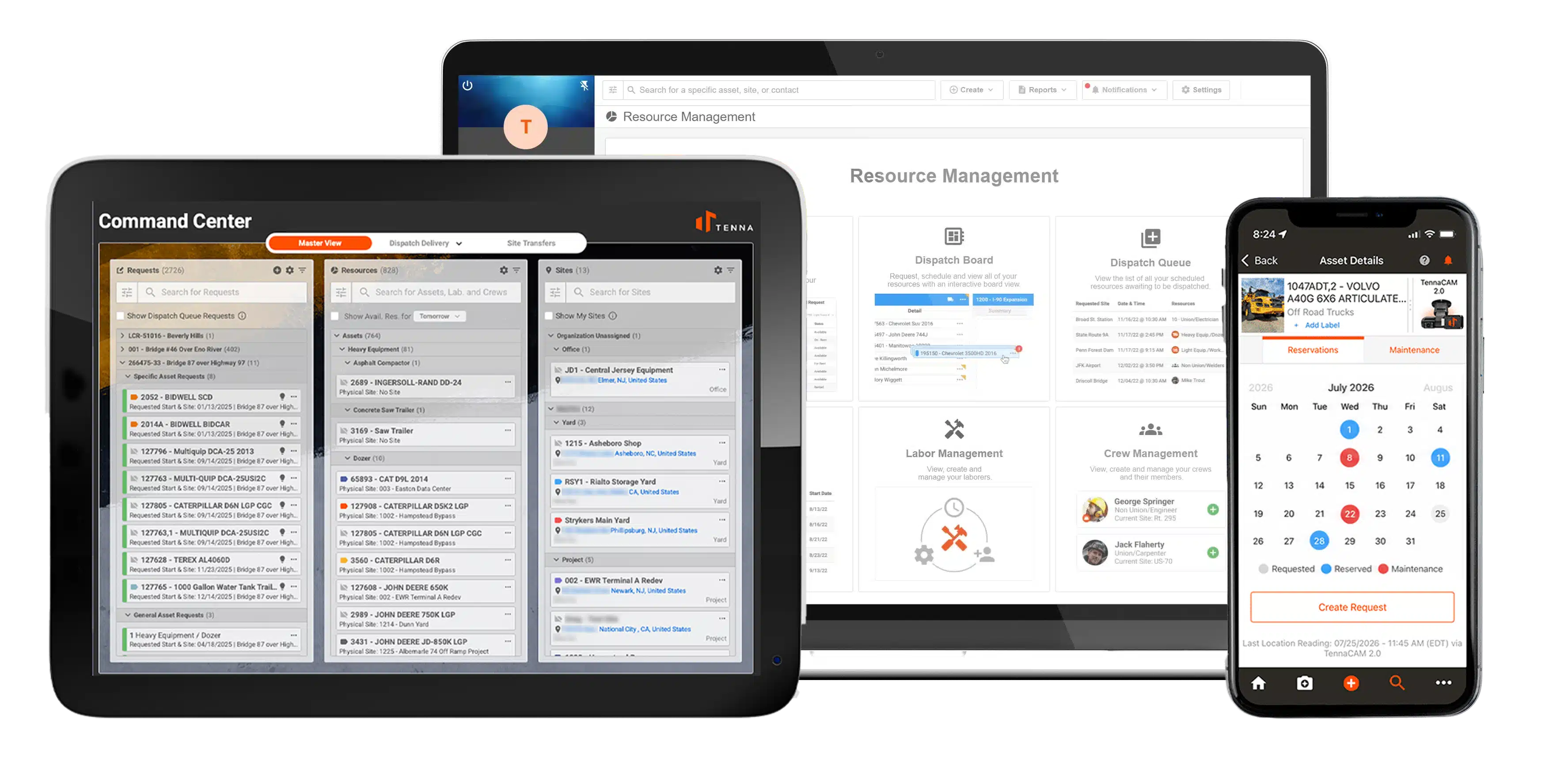
Tenna’s Dispatch Command Center was built to that standard. It consolidates the entire resource management workflow into one live workspace with three purpose-built modes:
- Master View – for planning and allocating across requests, resources, and job sites at a strategic level
- Dispatch Management – for managing moment-to-moment asset and labor movement across active dispatch events
- Transfers – for quickly reassigning fleet, laborers, and crews between sites and jobs, with clean project cost attribution
A single drag-and-drop motion handles what previously required five separate steps: approving a request, creating a dispatch event, assigning a resource, adjusting an itinerary, or resolving a conflict. For dispatchers managing dozens of job sites and hundreds of assets, that reduction in friction isn’t a convenience feature. It’s a meaningful reduction in operational risk.
2. Telematics as the Source of Truth, Not an Afterthought
Most dispatch tools show intended schedules. They tell you where equipment was assigned to be, which is useful but insufficient. The question that drives better dispatch decisions is where equipment actually is right now, what its current operational status is, and how that compares to where the plan has it going next.
This is the distinction between dispatch software built on a scheduling database and dispatch software built on live telematics. The former requires a human to keep it current. The latter updates itself.
Look for platforms that ingest live GPS and telematics data, from both proprietary hardware and OEM integrations across mixed fleets, and surface that data directly in the dispatch interface. When a dispatcher is deciding which excavator to send to a job, they should be seeing where each machine candidate is right now, not where it was assigned to be three days ago.
Tenna’s Resource Management system was designed on this principle from the ground up. Every connected asset feeds live location, status, and utilization data directly into the workspace. The result is that every dispatch decision is informed by operational reality, not planned intent.
3. Future-Looking Availability Intelligence
Current availability, knowing which assets are free right now, is the baseline. What separates advanced platforms from basic ones is the ability to surface future availability: what will be free next week, accounting for already-approved requests, active dispatch commitments, planned maintenance holds, and partial-day utilization.
Without forward-looking availability, dispatchers are constantly discovering conflicts at the last minute rather than planning around them days in advance. With it, a dispatcher can confidently schedule resources for next week’s site mobilization without having to manually cross-reference three systems to verify nothing is already committed.
Look for:
- Availability views that account for approved requests, active dispatches, and maintenance commitments simultaneously
- Recommended resources that surface the best-fit asset for each request based on category, location, availability, and utilization
- Conflict detection that flags and helps avoid potential double-bookings before they’re confirmed and lets dispatchers resolve them directly in the workspace
Tenna’s software allows contractors to view schedules into the future, with built-in conflict detection that flags issues before they become field problems.
4. Real-Time GPS and Asset Tracking Across Mixed Fleets
Any construction dispatch platform worth evaluating in 2026 must integrate real-time GPS tracking for all equipment classes.
Look for:
- Live location updates with meaningful refresh rates for operational use
- Geofencing with entry/exit alerts and automated site time-in/time-out records
- Historical location data for post-dispatch review and billing verification
- OEM telematics integration so machines already sending data from factory-installed systems feed directly into the dispatch workspace
- Offline and low-connectivity functionality for remote sites
GPS data is the foundation of every other dispatch decision. Without it, you’re dispatching based on assumptions.
5. Utilization Reporting and Idle Time Analytics
GPS tracking tells you where equipment is. Utilization reporting tells you what it’s doing when it gets there — and what it’s costing you when it isn’t doing anything at all.
Equipment spend runs 15 to 30 percent of a heavy civil job budget. On a $34 million project, that’s $5 to $10 million in exposure. The idle time and underutilization that erode that budget are rarely visible until after the job closes, unless your dispatch platform is surfacing them in real time. By then, the opportunity to act is gone.
Look for platforms that report on:
- Utilization rates by asset, job, and time period – identifying which machines are consistently underused and which jobs are hoarding equipment they don’t need
- Idle time by asset and site – flagging assets that are on-site but not working, with enough granularity to distinguish brief operational pauses from chronic idling
- Idle time alerts – proactive notifications when a machine crosses a defined idle threshold, so dispatchers can act before an hour becomes a shift
- Utilization trends over time – informing fleet right-sizing, rental vs. own decisions, and project estimating
Utilization reporting also feeds directly into smarter future dispatch decisions. When recommendations for incoming resource requests are weighted by utilization history alongside location and availability, the system is steering dispatchers toward assets that need the hours—not just the nearest available machine.
6. Maintenance and Compliance Tracking
Dispatch and maintenance are operationally inseparable, but in most construction organizations, they’re managed in completely separate systems. The result is predictable: a machine flagged for service in the shop gets dispatched to a two-week job because the dispatcher had no visibility into the hold. The machine goes down on-site. The job loses a day. The relationship between the shop and the project team takes another hit.
The standard worth holding dispatch platforms to is full maintenance visibility within the dispatch workspace itself—not a separate tab, not a phone call to the shop, but a live maintenance status that is part of the availability logic the system surfaces when a dispatcher is making an assignment.
Look for:
- Maintenance holds surfaced in availability logic – assets flagged for service, inspection, or repair automatically removed from available inventory until cleared, with no manual communication required between shop and dispatch
- Upcoming service visibility – not just current holds, but assets approaching a service interval, so a dispatcher doesn’t assign a machine to a three-week job when it’s due for an engine service in five days
- Inspection record integration – pre- and post-shift digital inspection completions tied to asset availability, so a machine that failed an inspection this morning can’t be dispatched this afternoon without a resolved status
- Maintenance history as a dispatch context layer – giving dispatchers visibility into recent repair history when choosing between two otherwise equivalent assets, so a machine that’s been in and out of the shop for the same issue three times this month doesn’t get sent to the most critical job on the schedule
When maintenance data lives in the same system as dispatch and feeds into the same availability logic, any inter-departmental tension between shop, field, and office loses its structural cause. Everyone is working from the same status. The machine either is or isn’t available, and the system says so.
7. Construction-Specific Workflow Design
Many dispatch and scheduling tools were originally built for trucking, field service, or general logistics then adapted for construction. The difference shows in the details. Construction dispatch has specific realities that generic tools don’t account for:
- Mixed fleets of tracked and non-tracked assets
- Requests that arrive from foremen mid-shift, not always through a formal system
- Urgent overnight reassignments when a job’s needs change by morning
- Mobilization time between sites that affects true availability
- Separate workflows for equipment, laborers, and crews
- The need for general (category-level) requests as well as specific (named-asset) requests
- Asset and labor assignments that need to tie cleanly to job cost codes for billing accuracy
A platform that doesn’t account for these realities will require workarounds, and workarounds are where dispatch errors happen. Ask vendors specifically how they handle each of these scenarios. The depth of their answer tells you whether the product was designed for construction or for construction-adjacent logistics.
8. Bulk Actions for High-Volume Request Management
On large or multi-site operations, dispatcher inboxes can fill with dozens of resource requests in a single morning. The ability to approve, deny, cancel, or reassign multiple requests simultaneously, rather than processing each one individually, isn’t a luxury feature. It’s a capacity requirement for any operation managing more than a handful of active job sites.
Platforms that require request-by-request processing create an administrative bottleneck that slows every downstream decision. Look for bulk action capability as a standard feature, not a premium add-on.
9. Role-Based Views and Customizable Workspaces
Dispatchers, project managers, equipment managers, and field supervisors need different slices of the same operational data. A dispatcher needs the full request queue and asset availability. A project manager needs job-level resource visibility. A field supervisor needs to see what’s been confirmed and what’s incoming. An equipment manager needs maintenance status layered into availability logic.
Platforms with rigid, one-size-fits-all interfaces create noise for every user. Look for customization that lets each role shape the workspace to their specific context without requiring IT configuration to do it.
10. Mobile and Tablet Access with Full Functionality
Field supervisors and on-site dispatchers are not sitting at desks. Dispatch software that requires a desktop to function is dispatch software that the field won’t use, which means the office and the field end up working from different information, which is exactly the problem dispatch software is supposed to solve.
Mobile access should include full dispatch functionality—not a read-only view—so field supervisors can see, request, and respond to resource assignments without waiting on the office. Tablet optimization is particularly important for active construction sites where devices move between the trailer and the field. SMS capabilities are equally helpful for delivering messages to drivers from the system to alert them of any changes to their schedule for the day.
11. Reporting, Utilization Analytics, and Project Cost Attribution
Dispatch decisions generate data that has value well beyond the immediate assignment. Utilization reporting, idle time tracking, site time-in/time-out records, and job-level asset assignment histories all feed into better future dispatch decisions, more accurate project billing, and fleet-level planning.
Look for platforms that surface this data in actionable dashboards and that maintain clean job and cost code attribution throughout the dispatch workflow, so every asset hour ties correctly to a project for billing and construction resource management purposes.
Construction Dispatch Software Comparison Checklist
Use this when evaluating platforms. For a deeper breakdown of how leading solutions compare, see the guide to the best construction dispatch management software in 2026.
Unified Workspace and Core Dispatch
- ☐Single dispatch workspace — requests, approvals, scheduling, and dispatch in one interface
- ☐Drag-and-drop resource assignment and event management
- ☐Multiple purpose-built views (planning, dispatch management, transfers)
- ☐Bulk request actions (approve, deny, cancel, reassign)
- ☐In-workspace conflict detection and resolution
Telematics and Asset Intelligence
- ☐Live GPS tracking for all asset classes (heavy, mid-size, vehicles, small tools)
- ☐OEM telematics integration (CAT, Komatsu, Deere, Volvo, etc.)
- ☐Geofencing with automated site entry/exit records
- ☐Asset status and utilization data surfaced in the dispatch interface
- ☐Idle time tracking and alerts by asset and site
- ☐Future-looking availability (accounts for requests, dispatches, and maintenance)
- ☐Maintenance holds automatically remove assets from available inventory
- ☐Upcoming service intervals visible at point of asset selection
- ☐Recommended resources based on category, location, availability, utilization, and maintenance status
Field and Mobile
- ☐Full-functionality native mobile app (iOS and Android)
- ☐Tablet-optimized interface for field supervisors
- ☐Field-initiated resource requests
- ☐Push notifications for assignment changes and confirmations
- ☐Offline functionality with sync
- ☐SMS dispatch for drivers
Construction-Specific Workflow
- ☐Separate workflows for equipment, laborers, and crews
- ☐Support for general (category-level) and specific (named-asset) requests
- ☐Site and job transfer modes with clean cost attribution
- ☐Maintenance hold integration in availability logic
- ☐Mobilization and partial-day handling
Integrations and Data
- ☐ERP / accounting integration (pre-built or API)
- ☐Project management platform sync
- ☐Open API and webhook support
- ☐Utilization and idle time reporting
- ☐Job-level cost attribution throughout dispatch workflow
Scale and Usability
- ☐Role-based views and customizable workspace
- ☐Performance at scale (fast search and scroll across large fleets)
- ☐Multi-site and multi-division support
- ☐Onboarding, training, and implementation support
Take Control of Your Resource Management with Tenna
Construction is the last major industry where multi-million-dollar resource decisions are still routinely made on a whiteboard or a digital equivalent of one. The cost shows up as idle time, avoidable rentals, mis-dispatches, and hours of administrative work that no one is billing for.
Tenna’s construction dispatching software is a category-defining shift away from that model. It’s the first construction dispatch workspace where telematics is the actual source of truth, where every resource decision is informed by where equipment is right now, what its real availability looks like accounting for maintenance and existing commitments, and which asset is genuinely the best fit for each incoming request.
Whether you’re managing a regional fleet of 50 machines or a multi-division operation running thousands of assets across dozens of sites, Tenna’s software is built to scale with the complexity your operation actually lives with.
Procurement Strategy Should Match Your Operational Strategy
Captive insurance pressure isn’t going away. If anything, mandates around driver monitoring, video telematics, and fleet safety technology will become more prescriptive over time. That pressure is real, and responding to it is not optional.
But there’s a meaningful difference between reactive fleet procurement and strategic fleet procurement.
Reactive procurement solves the immediate compliance requirement and often creates a new set of operational problems in the process. Strategic fleet procurement treats the compliance requirement as a catalyst to invest in broader operational capability: unified asset visibility, centralized workflows, integrated data, and a technology foundation that scales with the business.
Smart fleet procurement in construction means thinking beyond trucks, and investing in platforms that support the entire operation, not just the assets that show up on your insurance schedule.
The contractors who win over the next decade won’t be the ones who bought the most features. They’ll be the ones who built the most cohesive operational systems and made technology procurement decisions that served the whole business, not just the function that was feeling the most pressure at the time.