Every fleet operator knows the feeling. A crew is standing around waiting on an excavator that’s still tied up on another job. When the dispatcher calls around trying to track it down, three different people give three different answers. They’re each working off their own version of where the equipment is, and none of those versions match what’s actually happening on the ground.
Dispatch and scheduling software fixes that exact problem, along with a handful of others most fleet managers run into. The trouble is, a lot of heavy equipment operations teams are either running without one, or making do with software built for a different industry and separate from their telematics system.
In this blog, we’ll walk through what dispatch and scheduling software actually solves, which operations should have it, and what separates a system built for heavy equipment fleets from one built for smaller operations or a different industry entirely.
What Is Dispatch and Scheduling Software for Construction Fleets?
Scheduling software (in the context of logistics, not project sequencing) enables the team to plan: which pieces of equipment go to which job, on which day, for how long, when it should be down for maintenance, etc.
Dispatch software enables and facilitates what happens when that plan meets reality: confirming an assignment, redirecting a crew, or rapidly deploying an available loader when the scheduled unit breaks down mid-shift.
Dispatch and scheduling software brings both of those jobs into one place. A whiteboard or a shared spreadsheet only stays accurate with a constant stream of phone calls, texts, and manual updates. Telematics-driven software replaces all of that with a live view of every asset and every job site, so field operations teams can request equipment based on project dates and actual need.
Who Needs Heavy Equipment Dispatch Software (and What Problems It Solves)
Most dispatch software you’ll find in a general search is built for technicians driving service trucks between customer addresses, not a fleet of excavators, loaders, and compactors moving between job sites.
Dispatch and scheduling software built specifically for heavy equipment solves a separate problem, one that looks different depending on your role in the company. Here’s how that need shows up differently depending on where you sit:
-
-
Fleet and operations managers are the ones accountable for utilization, often across double digits to hundreds of pieces of equipment at once. Their day-to-day problems include scheduling conflicts, endless emergency phone calls, and idle machines eating into productivity. Plus, they’re the ones who have to show leadership hard numbers proving the software is worth it.
Dispatch and scheduling software gives them a live view of every asset, so conflicts get caught before they cost a day. It also provides utilization data they can use to make informed decisions on how their fleet is being used, supporting optimization efforts or fleet portfolio rebalancing.
-
-
-
Company owners and executives at mid-size organizations are usually managing growth while still running fleet coordination through spreadsheets and manual tracking. What matters more to them than day-to-day dispatch decisions is scaling the business without adding a full layer of administrative staff just to keep equipment moving.
The right platform lets them take on more work without adding headcount, since dispatch and scheduling run through one system instead of someone manually coordinating every assignment by phone.
-
-
-
IT managers and procurement specialists get pulled in once a decision is close to being made. Their job is to vet whether a new system actually connects to the project management tools, accounting platform, maintenance software, and everything else already in place. That’s usually what gets a purchase approved internally.
Dispatch and scheduling software with native or direct integrations solves that problem before it becomes a blocker, rather than adding one more disconnected tool to the stack.
-
The Solution in Action
A-C Electric is a good example of what happens when a company solves their dispatching problem. Before switching to Tenna, confirming a delivery meant a series of phone calls, usually a foreman asking a driver whether the asset or material actually made it to the right site.
After making the switch, Joshua Navarro, who handles material and equipment management at A-C Electric, described what changed for him:
“We now have the capability of adding photos and putting notes on that dispatch request for the foreman to be able to see. So there’s a lot less phone calls… He can actually open up his dispatch and see the photos and see where we left the material.”
That’s the core problem this software solves. It’s less about adding technology for its own sake and more about giving everyone, from the yard to the front office, the same answer when they ask “where’s the equipment?”.
Key Features to Evaluate in Construction Dispatch and Scheduling Software
A mixed fleet of heavy equipment doesn’t run like a fleet of service vans, and it shouldn’t be dispatched like one either. That’s why it’s important to know what to look for as you compare software options.
Here are the top five things a dispatch and scheduling platform should get right:
-
- Live asset visibility. You should be able to see, in real time, where every piece of equipment is and whether it’s actually running. A dispatch board that only shows what’s scheduled, not what’s really happening, just moves the guesswork somewhere else. Look for a platform like Tenna’s Dispatch Command Center that shows you all your resources, equipment, and sites on one consolidated page.
- Maintenance status built into the dispatch decision. A dispatch tool that doesn’t know a machine is overdue for service, or already flagged with an open work order, will end up sending it to a job site anyway. The best systems stop that assignment before it happens so only healthy machines are being deployed onsite.
- A clear line between rented and owned equipment. It’s common for a company to rent a piece of equipment for one job while an identical one they already own sits idle on another site, unused and out of sight. Both mistakes cost money, the rental fee on one hand and the wasted owned asset on the other. All of this is easy to miss unless the software shows you what utilization looks like, where all equipment currently is, and whether it’s rented or owned. Good dispatch software surfaces any mismatches before you sign a rental agreement, not after the invoice arrives.
- Intelligent dispatch decisions powered by telemetry. Manual processes treat utilization and distance as afterthoughts. Typically, the only inputs are start date, requested location, and an assumed current location. A good dispatch solution should give you more, helping you keep mobilization costs down while maximizing return on investment. Telematics makes that possible. It empowers you to know where the asset is and where it needs to go, so distance to destination can confirm there isn’t a better unit sitting closer. Surfacing utilization in the decision gives managers the data to have informed conversations with construction supervisors when equipment needs to shuffle.
- Mobile access for the field. Dispatchers aren’t the only ones who need to be in the know. Field operations teams, supervisors, and drivers should be able to see, confirm, and update assignments right from a phone, instead of waiting on someone back at the office to relay it. Additionally, many drivers who do not have smartphones can be inhibited from using an app for dispatch communication. Tools that send SMS updates to drivers help last-minute changes reach them instantly, so they always know where they need to be.
Contractors who’ve made the switch to dispatching and scheduling software see it play out clearly in the field. At Anvil Builders, mobile access changed how quickly a crew could actually find what they needed.
“You can go look for a machine right from your cell phone. I would say Tenna has definitely sped up our workflows due to accessibility. This is huge, because everybody has this [a cell phone] on them all the time… I can go right to my phone, and I can find anything.” — Hayden Vreeburg, Equipment Manager, Anvil Builders
Anvil’s experience isn’t unique. Mobile accessibility tends to be one of the first things contractors notice once they’ve switched.
Curious about other must-have features? Read our deep dive about the top dispatch features for 2026.
The One Platform Difference
The strongest dispatch and scheduling software systems don’t operate on their own. They sit on the same platform as equipment tracking, maintenance management, and utilization reporting, so every dispatch decision is backed by the same data as the rest of the operation. That combination matters because a dispatch decision is only as good as the information a dispatcher can see when they make it.
For example, a dispatcher assigning a compactor can see, in the same platform, whether it’s due for service, how much it’s been used this month, and whether a cheaper option is sitting idle two job sites away. Having a streamlined system that’s running off the same accurate data means the decision is right the first time, instead of getting corrected later.
Fleet managers benefit here too, since every team pulls utilization, dispatch, and scheduling data from the same platform. Reports can be automated and routed to the right stakeholders and project teams, with data configured to match what each department actually needs to see. When accounting, the field, and the shop are all looking at the same numbers every day, phone calls, texts, and emails become the exception instead of the default way people stay in the loop.
Nor-Cal Pipeline’s story demonstrates what happens when you choose one platform that can handle it all. As Jerry Ferdun, Fleet & Equipment Director, put it, “Tenna’s primary benefit for me is its ability to help me organize the fleet…Tenna does that the best because it consolidates everything into one place.”
This is really the heart of how to select the best dispatch software for construction management: not just a tool that handles assignments, but one that ties dispatch, maintenance, and utilization together so every decision gets made with the same information.
Get Started With Tenna’s Dispatch and Scheduling Platform
If your team is still coordinating equipment over text messages and a shared spreadsheet or manually moving equipment on a whiteboard (even if it’s digital), the cost goes well beyond the occasional idle machine. The real cost is the hours spent chasing down information that should already be in one place.
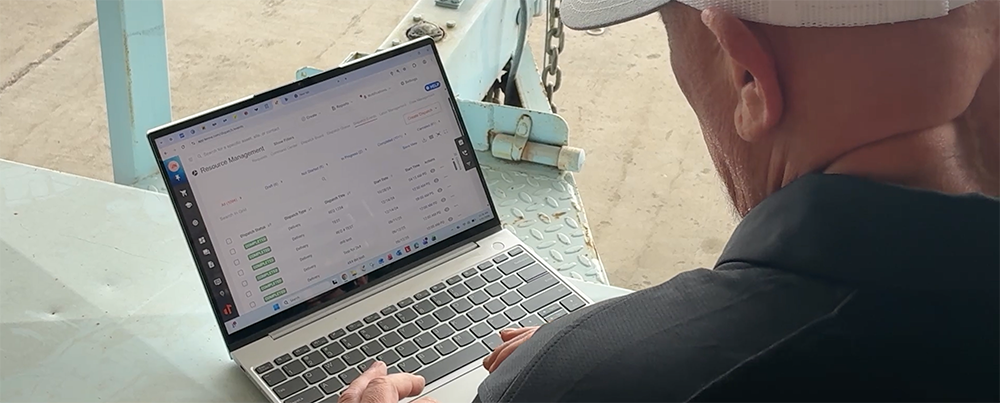
Tenna’s dispatch and scheduling platform gives fleet managers, dispatchers, and field crews a single, real-time view of every asset, tied directly into maintenance status and utilization data. It’s built specifically for contractors managing heavy equipment, not retrofitted from a field service tool designed for a different industry. Schedule a demo below to see how it can benefit your fleet.