
A daily production volume total might tell you how much material moved, but you still need to know whether the equipment spread is keeping pace with planned production and budget.
Whether you’re moving dirt for a highway expansion, grading a commercial site, or excavating for underground utilities, you need to answer questions like:
- Which machines completed the work?
- What did the equipment cost per yard?
- Where are our bottlenecks? And which crews/equipment/haul routes are involved?
- How does actual production compare to the estimate for this phase?
Answering these questions in real time requires production tracking, equipment data, and job cost information that line up to actual productivity.
Earthwork contractors track production by measuring loads completed, cubic yards per load, haul cycle times, and production rates by crew, machine, and shift. Earthwork software is what helps capture those quantities in real time, compare them with planned production, and connect the work completed to its associated equipment and job cost.
Here, we’ll dive into how contractors use earthwork software to measure and optimize field operations, then highlight the considerations you should take when choosing a software provider.
What is Earthwork Software, and What Does it Track?
Earthwork software is any software used to plan, measure, and control the movement of production materials on a construction site.
The most advanced contractors use earthwork software to compare planned quantities and budget against live production quantities and cost (per each project). With that, they can catch cost overruns and inefficiencies in real time, and build a production history estimators can use to price comparable work in the future.
What Earthwork Software Tracks
Whether it’s mass excavation, utility installation, roadbuilding, or site preparation for concrete and paving, contractor margins depend on cubic yards moved per day, hours per machine, and cost per yard. Earthwork software collects those numbers and much more.
1. Production Quantities
- Load counts by equipment
- Cubic yards or tons hauled onsite in addition to those imported and exported
- Progress by area, station, or phase
- Individual haul cycle segments
2. Equipment Activity
- Engine hours per machine, per job, per day
- Working, idle, and standby time
- Jobsite arrivals and departures, tracked with geofences
- Haul cycle times and distances
3. Production Rates
- Units produced per machine hour and per crew hour
- Loads per hour for each truck
- Trends across jobs, crews, and equipment classes
4. Cost
- Equipment cost per hour and per unit of production, such as cost per cubic yard
- Labor, fuel, and maintenance cost tied to specific jobs and cost codes
How Leading Contractors Use Earthwork Software to Track Production
Contractors track production by setting activity-level targets, capturing daily quantities, matching equipment activity to those quantities, and comparing actual results with the original budget and production plan.
The workflows below, when combined, give project teams, the back office, and executives a consistent, shared basis for construction productivity tracking across all of their jobs.
1. Establish Production Targets and Cost Codes
Contractors start by breaking the estimated scope into measurable work activities, each with an expected quantity, production rate, and associated cost code.
On a commercial site development project, for example, a contractor might establish daily production targets for stripping topsoil and completing bulk excavation before fine grading begins. Those targets account for estimated quantities, haul distances, equipment spreads, and site conditions.
With earthwork software, you can turn those estimates into daily production targets. Superintendents and foremen can track against them in the field, while project teams can use those targets to keep a real-time eye on job progress.
2. Automatically Track Loads and Completed Quantities
Contractors use earthwork software to automatically count loads, track material movement, and measure haul cycles as equipment operates throughout the shift.
By collecting activity data directly from excavators, loaders, haul trucks, and placing units, these systems capture production without requiring crews to manually count trucks or reconcile load sheets at the end of the day.
Each recorded load contributes to a detailed production history, including when and where material was loaded and dumped, the equipment involved, and how long each segment of the haul cycle took.
3. Match Equipment Activity to the Work
Contractors match equipment activity and operating hours to the jobs and activities where machines are working, and do so in real time. This helps them understand how their equipment is being used and how that activity is contributing to completed production and cost.
For example, say you have four trucks on a haul route. Across one shift, all four log eight engine hours inside the jobsite geofence. On an hours report, each one looks fully used. Matched against load records, that picture changes.
It takes about three minutes to load a haul truck and another six to complete the cycle. The truck to excavator balance may be off slightly. As the day moves on, queue time at the fill starts to tick up as some trucks navigate the return route faster than others. The queue time still shows up as engine hours and they still get charged to the job.
With hours, loads, and cycle segments lined up, the super can see the spread is running a truck heavy.
This information also helps project teams evaluate whether their equipment spread is delivering the productivity expected from the hours and resources committed to each job.
4. Compare Real-Time Output and Cost to Planned Rates
Contractors compare completed quantities and actual production rates against the targets established during budgeting and planning.
Earthwork software helps project teams monitor production rates and cost per shift, tying equipment hours to specific cost codes, and quantities to specific machines.
That means you’re able to measure how a job is pacing to planned output, and whether that output is coming at lesser or greater cost than originally budgeted.
In this environment, decisions don’t have to be, “fix the quantity now, and worry about the cost later.” Contractors can account for both production and cost while making surgical adjustments to active projects.
Why Cost per Yard Usually Arrives Late
On a mixed spread, inputs come from a lot of different places:
- Loading equipment hours may be in OEM portals like VisionLink or JDLink
- Hauling equipment hours come from JDLink or Caretrack
- Each OEM portal has its own login, so pulling hours for one spread means signing into several systems and exporting from each
- Production volumes comes from daily reports and (paper) truck tickets
- Rates are in a spreadsheet or work memo sitting in someone’s trailer
All of this information has to be compiled, confirmed, and keyed into an ERP. Each source uses its own unit IDs, timestamps, and reporting periods.
Lining them up means running exports, matching unit numbers, and calling foremen for confirmation. By the time this all ties out, the phase, or even the job itself, may already be finished.
How Earthwork Software Connects Production Quantities to Equipment Cost
Earthwork software connects production quantities to equipment costs.
It automatically matches equipment hours to the jobs where machines worked, applies the appropriate charge rates, and uses completed quantities to calculate equipment cost per cubic yard. In Tenna’s case, it all starts with telematics data.
It can take days to manually pull together a cost per yard metric, after gathering equipment hours, rates, and production quantities from multiple systems. With those records connected in one platform, contractors can monitor cost per yard as the work happens.
Assigning Equipment Hours to Jobs and Rates
Earthwork software replaces manual reconciliation with a shared record of equipment activity, job assignments, rates, and production quantities.
Tenna, for example, pulls engine hours, idle time, and location for heavy equipment and trucks into one system. Geofences around each jobsite detect arrivals and departures and open and close job assignments automatically. Layered geofences can help you split one site into discrete scopes of work with different billing scenarios, such as a borrow pit or the main fill.
Platforms like Tenna apply your rates to each hour, with separate rates for working, standby, and idle time. Account-wide rate templates set the baseline, but job-level overrides cover contracts with unique requirements, allowing exceptions to be routed to a person for approval.
Calculating Equipment Cost per Cubic Yard
Once hours and rates are matched, the unit cost is a simple division. Assume a spread completes 1,200 cubic yards during a shift:
- Excavator: 8 operating hours × $175 per hour = $1,400.
- Dozer: 8 operating hours × $125 per hour = $1,000.
- Haul trucks: 24 combined hours × $110 per hour = $2,640.
- Total equipment cost: $5,040.
- Equipment cost per cubic yard: $5,040 ÷ 1,200 = $4.20.
If output falls to 900 cubic yards with the same equipment charges, the cost rises to $5.60 per yard.
The equipment total has not changed, but fewer completed yards carry that cost. Software that reports quantity and equipment cost side by side will show this shift during the job, instead of weeks later.
Syncing Field Records With Accounting
Even after the field hours are collected, accounting still has to verify assignments, apply rates, and prepare the cost entries.
When hours, rates, and job assignments are already matched in one platform, that prep is finished before anyone opens the ERP.
Tenna’s platform, for example, connects to construction ERPs including Viewpoint, Sage, and Foundation, making it simple to carry automated data over into financial workflows.
Choosing Earthwork Software: Six Questions to Ask
When choosing an earthwork software provider, ask each vendor to walk through one of your recent jobs, from field execution to job costing, and use these six questions to guide the demo:
- Which quantities are captured automatically? Separate load detection, estimated cubic yards, and directly measured quantities. Identify where field entry or verification remains necessary.
- Does it cover your mixed fleet? Check manufacturers, machine types, owned and rented equipment, hardware requirements, and multi-jobsite visibility.
- Can quantities connect to equipment costs? Ask how rates, hours, and production records produce a unit-cost comparison against the bid.
- How are projects and cost codes assigned? Review site boundaries, activity changes, approvals, and equipment transfers between jobs.
- What reaches your accounting system? Confirm supported records, transfer direction, frequency, and error handling for your specific configuration.
- When can supervisors act on the information? Compare collection frequency with what reaches reports. Test whether short queues and cycle segments remain visible.
How Tenna Supports Earthwork Production Tracking
For heavy civil and infrastructure contractors, earthmoving is often one phase of a much larger project. Excavation and subgrade preparation give way to aggregate placement, paving, concrete work, and other activities.
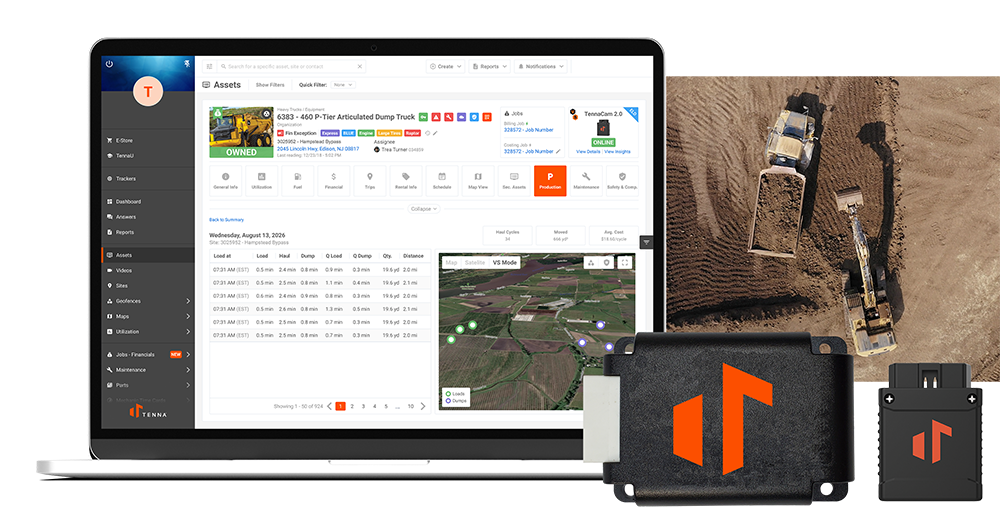
Tenna is designed to connect production information across these phases, with Load Tracking providing automated visibility into the earthmoving and hauling work.
Load Tracking collects per-second machine data from excavators, wheel loaders, articulated haul trucks, and dozers, collected with TennaCANbus and TennaFLEET II trackers. With it, contractors can automatically track loads and dumps, estimate yards, and compare production against daily targets.
Haul cycles are split into segments at the bench queue, loading, haul, dump queue, dump, and return.
Field teams get time back on manually tracking loads and spotting bottlenecks, while project teams can easily measure production and cost against budgeted cost per yard, per cycle, and so on.
Manage Earthwork Production with Quantities and Cost Together
Earthwork software helps you assess completed work against the rate you planned.
Loads and cubic yards show the output, haul cycle segments explain the pace, equipment charges reveal the cost per yard, and together, those records support earlier intervention into bottlenecks and better-informed bids that protect margin.
With Tenna’s Load Tracking, superintendents can see where production is falling behind while the spread is still running. Project managers can compare output and equipment costs against the estimate, and estimators can use actual production history to inform the next bid.