Load Tracking

Automated Load Counts and Haul Cycle Timing

Know What Your Equipment Moved Today and What Each Yard Cost

Load counts often come from a spotter with a clipboard and stopwatch, then have to be reconciled against tickets that don’t true up until the end of the month. With these methods, contractors don’t know whether a job made or lost money until after it’s over.

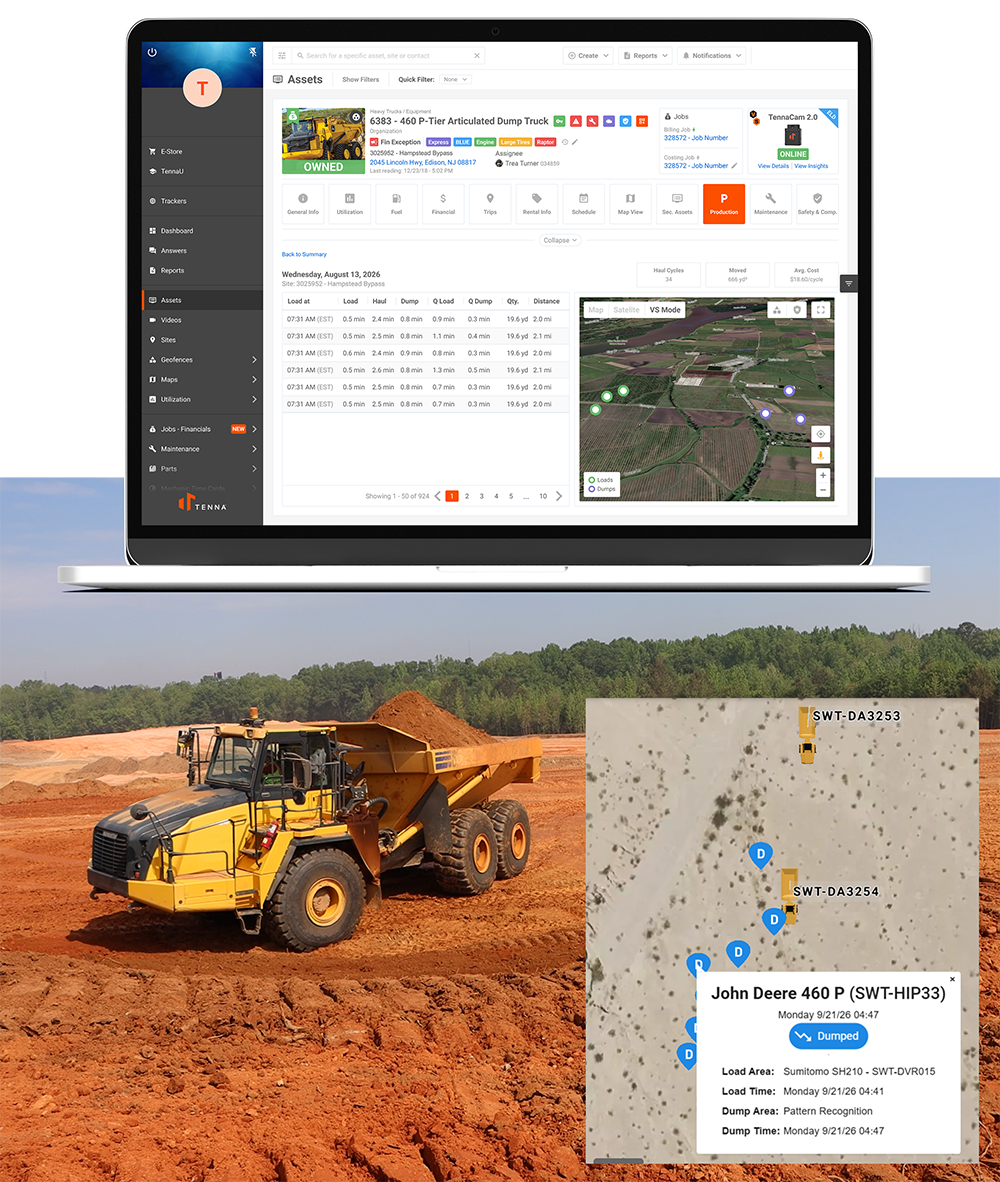
Load Tracking brings production management to the haul cycle. As a solution within Virtual Superintendent, it automatically counts loads and time haul cycles on earthwork jobs. Contractors can see load and dump segments as they happen to know how many loads each machine moved per day, how many cubic yards that represents, and what each yard cost.

Using second-by-second telematics data from excavators, loaders, and articulated dump trucks, civil contractors can use Load Tracking to:

  • Count loads and estimated yards moved by truck and loader, per shift
  • Time each cycle segment, from the time at the cut in the queue and loading, the haul to the fill, time at the fill in the queue and dumping, and return to the cut
  • See each truck’s actual route in real time
  • Compare active production to daily targets while shifts are still running
  • Compare cost per cubic yard to the bid rate
  • Know how much queue time is costing you
Book a Demo →
Load Tracking - load tracking

"Virtual Superintendent captures our production data automatically, saving me and my crew hours per day completing manual reports and paperwork." —General Superintendent

Benefits of Load Tracking in Tenna

Retire the Clipboard and Stopwatch

Capture every load and dump automatically from machine data, and give field engineers and foremen the time back they spend on manual tracking and end-of-week reconciliation.

Track and Catch Bottlenecks as They Happen

Break long cycles into load, haul, and dump segments. With data by the second, pinpoint the exact part of each cycle where delays are occurring, as they’re occurring.

Check Progress Against Plan Anytime

Loads and yards stay current against daily targets, so you can check progress mid-shift, at the end of the day, or before tomorrow’s start-of-shift meeting. If production falls off pace, you can adjust trucks or loaders tomorrow, instead of next week.

Bill Unit-Work More Frequently

Track production quantities in real time to support more frequent and accurate billing on unit-price work, while reducing how often you need costly drone surveys to verify progress.

Track Your Rate Against the Bid and Budget

Automatically tie load counts and quantities to cost codes and see your cost per cubic yard against the rate you bid and budgeted.

Trusted Data on Every Load

Replay any load to see how it was counted, including the truck, time, route, and dump location behind it. When a count gets questioned or you need a closer look at production, you have the record to back it up, even years after closeout.

Key Features of Load Tracking in Tenna

With Load Tracking, see each load and dump recorded as it happens, captured from 1 Hz (or per-second) machine data via Tenna hardware. Every cycle is logged by truck, along with the:

  • Time it was loaded
  • Duration of each segment
  • Quantity carried
  • Distance traveled


Daily totals for cycles, yards, and average cycle time build through the shift without your crew having to enter anything.

Load Tracking - load tracking

Each Load Tracking cycle is split into six segments:

1. Queue at the bench → 2. Load → 3. Haul → 4. Queue at the dump → 5. Dump → 6. Return

Standard telematics typically gives you one unsegmented data point every 10 seconds. Tenna captures one data point per second, applying it across six stages of the cycle.

On a 13-minute cycle, that’s 780 segmented data points versus 78, giving you 10x the resolution. You can be more granular in understanding exactly where each cycle is, and quickly identify a 60-second queue at the bench, or a truck sitting at the fill, waiting on the spotter while it’s still happening.


Load Tracking - load tracking

Watch trucks and loaders run cycles in real time on a map of the jobsite, and see route paths with second-by-second positions. See where drivers are and where they’re moving. Spot detours, slowdowns (e.g. rutted sections), and congestion on haul roads, exactly where they happen.

Load Tracking - load tracking


Monitor production across multiple jobsites from the field, site trailer, or office. Access live haul maps, load counts, and cycle times for every truck and loader to see how each spread is performing against its production targets. With standardized data collected the same way across every job, you can identify delays, compare progress across jobs, and prioritize where your attention is needed without having to be on site.

Load Tracking - load tracking

Load Tracking - load tracking

"Engineers spend more time on analyzing the data and being proactive with the tasks ahead, as opposed to spending time entering load sheets and costs. Virtual Superintendent does this for us." —Project Manager

Load Tracking Use Cases

Daily Production Tracking

Set daily production targets and track loads and yards against them by truck, loader, and shift. Review the previous day's actual production, see where crews fell short, and use those numbers to set realistic targets for the next shift.

Haul Cycle Diagnosis

Pinpoint exactly where haul cycles are hurting productivity. On a one-mile haul, a 30-second queue at the bench, an extra minute of loading, and an uneven haul road can quickly push a 9-minute cycle to 12.5 minutes. Segment-level timing shows you which leg of the cycle is costing you the most.

Manage Cut and Fill Quantities

Load Tracking ties every load to its unit quantities, giving you a running total of cubic yards moved out of the cut or placed in the fill. Compare actuals against the haul plan to see if the cut is running short or the fill is taking more material than expected, and adjust before you bring in borrow, haul off waste, or rehandle dirt.

Daily Reporting to Leadership and Clients

Automate reports to project managers, owners, and clients with loads, yards, and cycle times by truck and shift. Everyone above the job gets the numbers they need every day, without your field crews and engineers having to fill out, collect, approve, and manually add logs to a spreadsheet.

Material Origin and Placement Records

Trace individual loads from their origin to their dump location, including the truck, loading time, and route traveled. Retrieve historical records to investigate material quality issues, verify placement, or support claims two years later when a question comes up.

Bidding Haul Work from Real History

Use actual cycle times, quantities moved, and production rates from completed jobs to estimate future haul work. Compare performance across equipment combinations and haul conditions to build bids around proven production rates rather than assumptions.

Better Decisions Across Every Leg of the Load Haul Dump Cycle

LOAD

Identify Loading Delays, Balance the Spread
Compare queue times, loading durations, and loading rates across excavators and wheel loaders. When trucks are stacking up at the bench, the loader is your constraint. When the loader sits between trucks, you're short on trucks. With Load Tracking, you can adjust truck assignments, bench staging, or loader placement to keep the spread productive.

HAUL

Identify Haul Delays and Optimize Truck Routes
Track loaded haul and empty return times and truck speeds throughout the shift. When haul times climb in the same location, over the same distance, you can identify where the road is slowing drivers down. You can prioritize grading or watering on the sections where trucks lose the most speed and improve turnaround on every cycle.

DUMP

Keep Trucks Moving Through the Fill
Monitor queue times, dumping durations, and truck movement through each fill area. Identify when congestion or limited dozer coverage is slowing production, then adjust spotting, open additional dump locations, or reassign support equipment.

Get the Full Production Picture Beyond Load Tracking

Load Tracking gives you production visibility into every haul. Virtual Superintendent connects that production data with manpower, materials, and additional cost capture across the rest of the project.

  • Capture labor time by crew, employee, and cost code
  • Record material tickets and quantities against the work performed
  • Compare production, labor, and material cost against the same cost structure used to plan and budget the job

Bring more of the job into one picture, so project teams can see what’s getting done, what it’s costing, and where performance is starting to drift while the work is still happening.
Explore Virtual Superintendent →
Load Tracking - load tracking

Learn more about how you can automatically count every load and time every cycle on your earthwork jobs.

Frequently Asked Questions

What equipment does Load Tracking work with?
Contractors can track excavators, wheel loaders, articulated haul trucks, and rigid dump trucks from any equipment manufacturer. A Cat excavator loading Deere ADTs shows up in Tenna side by side.
Yes. Load Tracking runs on Tenna telematics hardware, which captures machine data once per second (1 Hz). John Deere MTG devices are also supported. Standard telematics providers report in anywhere from 10-seconds to multi-minute intervals, which is too slow for you to separate queue, load, and haul segments to see the full picture of what is really happening on the jobsite.
With a cycle-timing app, you depend on someone watching every truck, which gets hard once eight trucks are running the loop. With standard telematics, you can see that a truck left the bench and reached the dump. With Load Tracking in Tenna, you can see every second of the trip, so the queue, load, haul, and dump of each truck all show up as a separate segment.
Superintendents use Load Tracking to track production and adjust the spread during the shift. Project managers use it to identify counts and quantities for budget tracking and billing. Field engineers benefit from Load Tracking by getting back the hours they spent counting loads by hand.

See Where Your Haul is Making and Losing Money

Book a Demo