Understanding Internal vs. External Equipment Billing
Before diving into integration strategies, it’s important to distinguish between two types of equipment billing that telematics automation addresses.
Internal Billing or Cost Allocation
Internal construction billing involves charging equipment costs between divisions, projects, or cost centers within a construction business. It’s about accurate job costing, ensuring that Project A doesn’t subsidize Project B’s equipment usage.
Without automation, internal billing relies on field supervisors manually recording equipment transfers on timecards or spreadsheets. This often leads to disputes between finance, equipment and project managers over inaccurate project P&L.
And when equipment moves between jobsites mid-week or works across multiple cost codes in a single day, manual tracking breaks down entirely.
External Billing or Customer Invoicing
External construction billing involves invoicing customers for progress on the project, which, in most cases, includes equipment usage. Whether renting equipment to another contractor or self performing the work, it is important to understand the duration on site, hours run, and what work was performed.
Without automation, external billing depends on estimates, delayed field reports, and manual invoice creation; all of which lead to customer disputes over hours, rates, and allocation.
And when a customer questions whether your excavator really worked 47 hours on their project, you’re left defending handwritten logs against their doubts.
Strategies for Internal and External Billing Workflows
The strategies below apply to both internal and external billing workflows. In many cases, the same integration architecture supports both internal cost entries flow to project accounting, while external billing entries flow to accounts receivable.
Strategy #1: Implement an Automated Construction Billing System That Accepts Telematics Data
The foundation of billing automation isn’t just having a construction billing system; it’s having one that can actually ingest telematics data without manual entry, whether you’re allocating costs internally or invoicing external customers.
Most accounting systems precede telematics. They expect someone to type in equipment hours, review timecards, or manually allocate charges to job codes. That’s the bottleneck. An automated billing system treats telematics as the source of truth, not as a reference point someone has to transcribe. It can, therefore, easily accept data without the need for middleware.
To eliminate manual entry for both internal and external billing, your system must be able to:
- Import engine hours, mileage, or GPS activity automatically from telematics platforms.
- Apply billing rules consistently across equipment types, rate structures, and agreements.
- Generate invoices without duplicate entry using telematics timestamps as the trigger.
- Sync data with your ERP so cost codes, job assignments, and payment status stay current.
This is the exact gap Tenna’s Asset Financials was purpose-built to close. Rather than bolting billing logic onto a fleet-tracking tool, it’s designed from the ground up as a telematics-powered job costing and billing engine: geofence-triggered job assignment, configurable rate tables by asset class or job, and automated cost allocation that syncs directly to your ERP, with no manual transcription step in between.
 → Think of it this way: If someone on your team still has to log into a telematics dashboard, download a report, and manually enter hours into your accounting system, you don’t have automation. You have digital paperwork.
The goal is to make billing a byproduct of equipment usage, not a separate administrative task.
Strategy #2: Use Real-Time Telematics Data for Accurate, Dispute-Free Invoicing
Billing disputes almost always come down to one thing: someone doesn’t trust the numbers.
For internal billing, project managers question whether their cost code really should be charged for equipment that “wasn’t on site that long” or that “sat idle most of the day.” Without proof, these disputes turn into heated debates between PMs, with the loser absorbing costs that should have been allocated elsewhere.
For external billing, customers question the hours, the dates, or the allocation. When your invoice is based on estimates or field notes written hours after the fact, they have a point.
Real-time telematics solves both scenarios by providing indisputable, timestamped proof of equipment activity. Modern telematics platforms capture:
- Engine hours – actual runtime, not operator estimates
- Idle time – separating productive use from wasted fuel costs
- Mileage – distance traveled for hauling or transport billing
- Cycle counts – load counts for haulers, dump trucks, or concrete equipment
- Jobsite entry/exit timestamps – when equipment arrived and left via geofencing
- Equipment status – whether the machine was operating, idle, or off
This granular data enables multiple construction billing models:
- Usage-based billing – charge per engine hour or cycle, not per day
- Time-based billing – apply different static rates for time on job based on geofences
- Rate variation by equipment type – enforce rate tables that adjust based on machine class
- Rate variation by job – enforce rates that differ from standard projects to account for customer provided fuel or similar contract clauses
When disputes do arise, you’re not arguing from memory or handwritten logs. You’re showing GPS-verified timestamps and engine-hour reports, which changes the conversation entirely.
Strategy #3: Configure Automated Payment Reminders & Billing Notifications
Even perfect invoices don’t guarantee fast payment. Automated notifications ensure consistent follow-up without manual effort. Once your billing system generates invoices from telematics data, your ERP should automatically trigger:
- Invoice issued notification – sent when telematics data closes out a billing period
- Upcoming due date reminder – five to seven days before payment is expected
- Overdue reminders – escalating notices after the due date
- Payment confirmation – automatic receipt when payment is received
These notifications create accountability and transparency. Subcontractors and project managers see exactly when charges were applied and when payment is expected.
For contractors managing internal equipment transfers between operating groups, automated notifications also prevent jobsite managers from questioning charges weeks after equipment left the site.
Strategy #4: Integrate Telematics with Your ERP or Accounting System
This is where billing automation either succeeds or stalls. Telematics integration with your ERP eliminates the double-entry problem that kills accuracy and speed for both internal cost allocation and external customer billing.
Without integration, you have two sources of truth: the telematics platform knows where equipment is and how long it ran, while the accounting system knows what got charged internally to cost codes and what got invoiced externally to customers. Someone has to reconcile the gap manually, and that reconciliation introduces errors, delays, and missed charges.
ERP integration connects telematics and asset management platforms with accounting systems, allowing equipment usage, job codes, internal cost entries, external billing entries, and payment status to transfer automatically for a seamless, end-to-end financial workflow with fewer errors and faster billing cycles.
The typical integration points are outlined below.
For internal cost allocation:
- Equipment usage → cost entries – engine hours automatically post to jobs
- GPS/jobsite geofencing → job allocation – equipment is assigned to cost centers based on location data
- Asset maintenance costs → equipment P&L – repair and service cost recovery flows into fleet or asset-level profit statements, providing insights about rates and operational performance
For external customer billing:
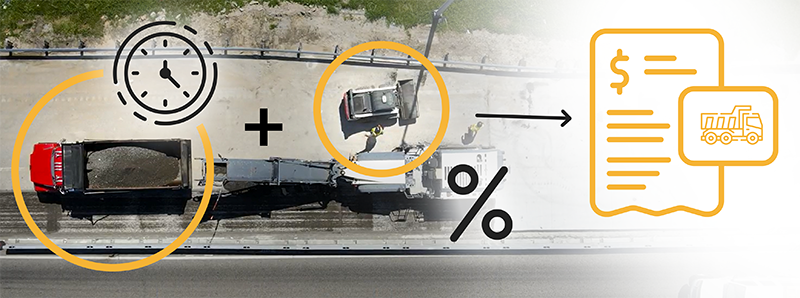
- Equipment usage → billing entries – engine hours convert to invoiceable charges
- Rate tables → invoice generation – customer-specific rates apply automatically based on equipment type and contract terms
- Invoice creation → AR workflows – invoices generate and post to accounts receivable without manual approval queues
- Payment status → telematics dashboard – field teams and project managers see which equipment charges have been paid
For both:
- Unified activity data – the same telematics event (e.g., engine hours, geofence entry/exit) drives both internal cost entries and external billing entries
- Audit trail – timestamped records show exactly when equipment was assigned, who approved charges, and when invoices were generated
→ For construction companies running mixed fleets, owned equipment, long-term rentals, and short-term subbed equipment, this integration ensures that billing rules apply consistently regardless of asset ownership.
→ Internal cost allocation might charge owned equipment at a lower hourly rate than rentals, while external customer billing might apply premium rates for specialized machines. Both sets of rules execute automatically based on the same telematics activity data.
The result is a clean, auditable record where operational data and financial data stay synchronized across both internal project costing and external revenue generation.
Strategy #5: Automate Reporting and Usage Analytics
Automated billing doesn’t just speed up invoicing, it reveals financial patterns that would otherwise stay hidden and at a regular reporting frequency.
When telematics data feeds directly into accounting, you can generate reports that show:
For internal cost visibility:
- Cost accuracy – whether equipment charges to internal projects are recovering actual costs
- Cross-charging disputes – equipment moves between jobs with clear timestamps and allocation records
- Project P&L accuracy – true equipment costs per job, not averaged or estimated rates
- Department utilization – which divisions are efficiently using shared equipment resources
For external billing performance:
- Underbilled equipment – machines that ran hours but weren’t invoiced due to missed job assignments
- Billing accuracy by customer – variance between contracted rates and actual charges
- AR aging by equipment type – which customers pay promptly, and which delay payment
- Revenue per asset – which pieces of equipment generate the highest external billing revenue
For overall fleet intelligence:
- Unassigned usage – equipment active on-site but not allocated to any job or customer
- Idle time waste – machines burning fuel without productive work, affecting both internal costs and external billing opportunities
- Jobsite utilization – which projects use equipment efficiently and which ones don’t
These reports shift equipment management from reactive to strategic. Instead of discovering internal cost allocation errors or external billing mistakes weeks after the fact, project managers and finance teams see real-time dashboards that flag issues while they’re still correctable.
Executives can identify which jobsites consistently over-allocate internal costs, which customers dispute external charges most often, and which equipment sits idle across both scenarios.
Usage-based reporting also provides visibility into asset-level profitability from multiple angles. When you know exactly how much each piece of equipment generates per job, fleet decisions become data driven, and you can answer questions such as:
- Should we buy or lease this type of equipment based on actual construction billing or cost patterns?
- Which machines are generating external revenue margin, and which ones are just covering internal costs?
- Are we deploying our highest-value assets to the right projects, both for internal efficiency and external billing potential?
- Which projects consistently undercharge equipment usage, and which customers accept billing without disputes?
→ This level of financial intelligence is what separates reactive equipment tracking from strategic fleet management.
Strategy #6: Choose a Telematics Provider Built for Construction
Billing automation only works if the telematics data being ingested is accurate, consistent, and relevant to contractor workflows. Platforms designed primarily for maintenance tracking or safety compliance capture valuable operational data, but they’re not architected to feed financial systems. The data exists, but it doesn’t translate into billing intelligence.
Generic GPS trackers might tell you where equipment is, but they won’t capture engine hours, distinguish between productive runtime and idle time, or integrate with mixed-fleet data. You end up with location dots on a map, not billing-ready activity reports.
Construction-grade telematics platforms provide:
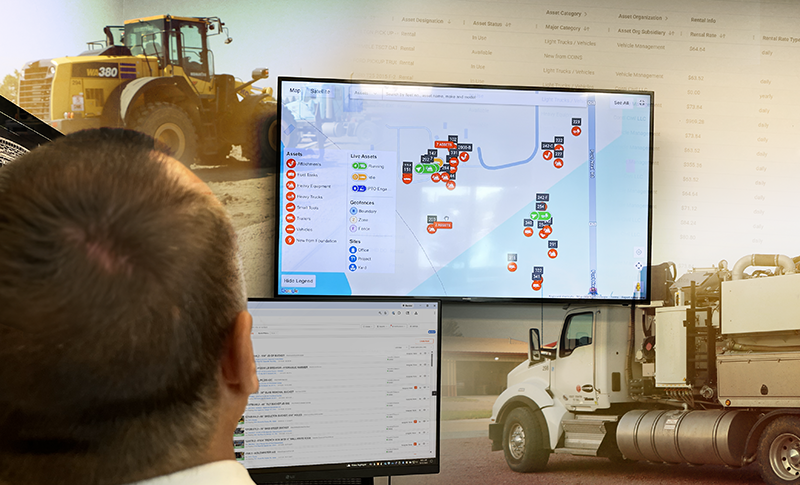
- Real-time telematics – live equipment status, not data synced once a day
- Engine-hour capture – direct integration with machine controllers, not proxy estimates
- Jobsite geofencing – automated job assignment when equipment crosses virtual boundaries
- Mixed fleet data standardization – owned assets, rentals, and subbed equipment reported in a unified format
- Activity timestamps – precise start/stop times for billing periods and shift tracking
- Maintenance, parts, work order, mechanic time and inspection data – service costs and downtime linked to asset records
- Dispatch and field workflow integration – field requests, work orders, operator assignments, and project data flow into billing
These data streams serve as the source of truth that construction billing systems rely on. If the telematics platform can’t provide clean, timestamped activity records, the billing system has nothing reliable to automate.
Exception Handling: When Automation Needs Human Oversight
Even sophisticated automation can’t handle every edge case. Construction-grade telematics platforms build exception workflows into their architecture rather than pretending automation solves 100% of scenarios.
Common exceptions requiring human judgment include:
- Equipment in maintenance – shouldn’t generate cost entries or billing
- Equipment in transit – geofence shows Job A, but equipment is traveling to Job B
- Rate overrides – customer has negotiated rates that don’t match standard tables
- Disputed allocation – equipment at jobsite but not working on that project
- Manual assignment – situations where geofence automation needs temporary override
The difference between basic and construction-grade platforms is how they handle these scenarios. Basic platforms either force exceptions into automated workflows or require manual intervention for every transaction (defeating automation’s purpose).
Advanced platforms flag exceptions proactively, allow authorized overrides with audit trails, and focus human judgment on the five-to-ten percent of cases that need it rather than forcing manual review of 100% of transactions.
This balance of automation for routine cases and intelligent flagging for exceptions enables accurate billing without the administrative burden.
The difference between “we have GPS trackers” and “we have construction telematics” is the difference between knowing where equipment is and knowing what it’s doing, whether you can bill for it, and when human judgment is required.
Looking Ahead: Financial Intelligence Meets Telematics Data
Billing automation is just the starting point. The real value emerges when telematics data becomes financial intelligence.
The construction industry is moving toward understanding true asset profitability from both internal cost efficiency and external revenue generation. Fleet decisions will be based on actual ROI data per machine, per project, per quarter. Project managers will see live dashboards showing not just equipment location, but deployment cost-effectiveness and margin generation.
The technology to bridge operations and finance with unified data is emerging. As this shift accelerates, internal cost allocation will become automatic and accurate, external billing disputes will become rare, and fleet management will become strategic.
This isn’t a distant future — it’s what Tenna’s Asset Financials delivers today. By rolling up utilization, cost, and billing data into a single per-asset view, it answers the question every fleet decision ultimately comes down to: is this machine earning its keep on this job, this period? That same P&L view supports buy, rent, redeploy, and retire decisions with real numbers instead of intuition.
Assets will stop being a cost center and start being a profit driver with measurable ROI. The question for contractors today isn’t whether to integrate telematics into construction billing, it’s whether your business can afford to keep operating without it while the industry moves forward.